
Key takeaways
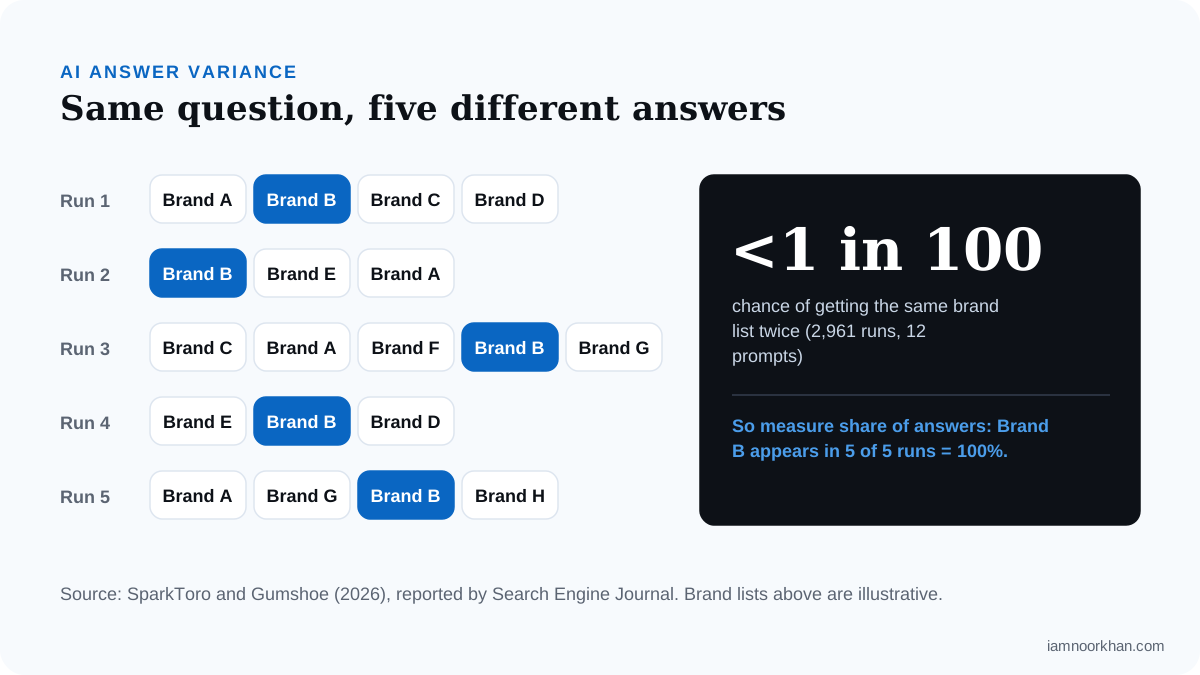
- AI answers are unstable: in SparkToro and Gumshoe's 2026 research there was less than a 1 in 100 chance of getting the same brand list twice. Measure share of answers, not rank.
- Run each buyer question 3–5 times per assistant and report the percentage of runs that mention you, cite you and describe you accurately.
- Use three layers: Search Console for exposure, GA4 for traffic and leads, and prompt sampling for presence.
- Search Console's generative AI reports (launched June 3, 2026) show impressions only, and AI Overview clicks still look like normal organic traffic in GA4.
- Fewer than 50 prompts is what IAB's 2026 guidance calls exploratory: a small monthly check is great for spotting trends and problems, not for setting budgets.
- The whole routine fits in about 2 hours a month with the copyable scorecard below.
Part of the SEO vs AEO vs GEO: What Actually Changes When AI Answers the Query series.
If you've asked ChatGPT about your business, felt a flicker of hope when it named you, then asked again and watched you vanish, you're not doing anything wrong. That's how these systems behave. AI answers change from one run to the next, there's no "position one" to track, and a lot of the value arrives without a click.
That's why most businesses either don't measure AI visibility at all, or measure it with a single screenshot that means very little. I've done this measurement for healthcare, e-commerce and SaaS clients, and the approach that holds up is calm and boring in the best way: the same buyer questions, asked several times, the same way, every month, alongside what Search Console and GA4 can genuinely tell you.
This guide gives you the full method: what each tool can and can't show, how to deal with answers that won't sit still, a copyable scorecard with formulas, and a routine that fits in about two hours a month.
AI search visibility by the numbers
AI search visibility is how often your brand is named, cited and accurately described in AI-generated answers, and the data shows why it needs its own measurement.
| What the research found | Source |
|---|---|
| Less than a 1 in 100 chance an AI tool gives the same brand list twice for the same prompt (2,961 runs, 12 prompts) | SparkToro and Gumshoe, 2026 |
| Position-one click-through rate is 58% lower when an AI Overview appears (December 2025 data) | Ahrefs, 2026 |
| Searchers clicked a traditional result on 8% of visits with an AI summary, versus 15% without one | Pew Research Center, 2025 |
| Traffic from generative AI tools to US retail sites rose 693.4% in the 2025 holiday season | Adobe, 2026 |
| AI assistants drive roughly 0.32% of all website traffic, against about 42.75% from Google organic | Similarweb, 2026 |
Put together: AI answers are reducing clicks from Google, AI referral traffic is small but growing fast, and the answers themselves are too unstable to measure with one check. A good method has to handle all three.
Why your rank tracker can't see AI visibility
Rank trackers measure a fixed list of positions, and AI answers have neither fixed lists nor positions. An assistant writes a new answer every time, often naming different brands in a different order.
In SparkToro and Gumshoe's 2026 research, roughly 600 volunteers ran 12 brand-recommendation prompts through ChatGPT, Claude and Google's AI (AI Overviews or AI Mode) a combined 2,961 times. Nearly every answer was unique in which brands it listed, their order and how many it included. The authors found that how often a brand appeared across runs was far more consistent than where it appeared, and suggested visibility percentage as the more reliable metric.
Assistants also differ in how closely they follow Google's rankings. Ahrefs' 2025 analysis of 15,000 prompts reported that only about 12% of URLs cited by ChatGPT, Gemini and Copilot ranked in Google's top 10 for the same prompt, while Perplexity's citations overlapped far more. Semrush's 2025 comparison study found a similar pattern: ChatGPT overlapped least with Google's top 10, and Perplexity most. So ranking well on Google is a strong foundation, but it doesn't tell you what each assistant will say. You have to ask.
If you're still getting your bearings on the terms, my guide to SEO vs AEO vs GEO explains how they fit together.
The three layers of AI visibility
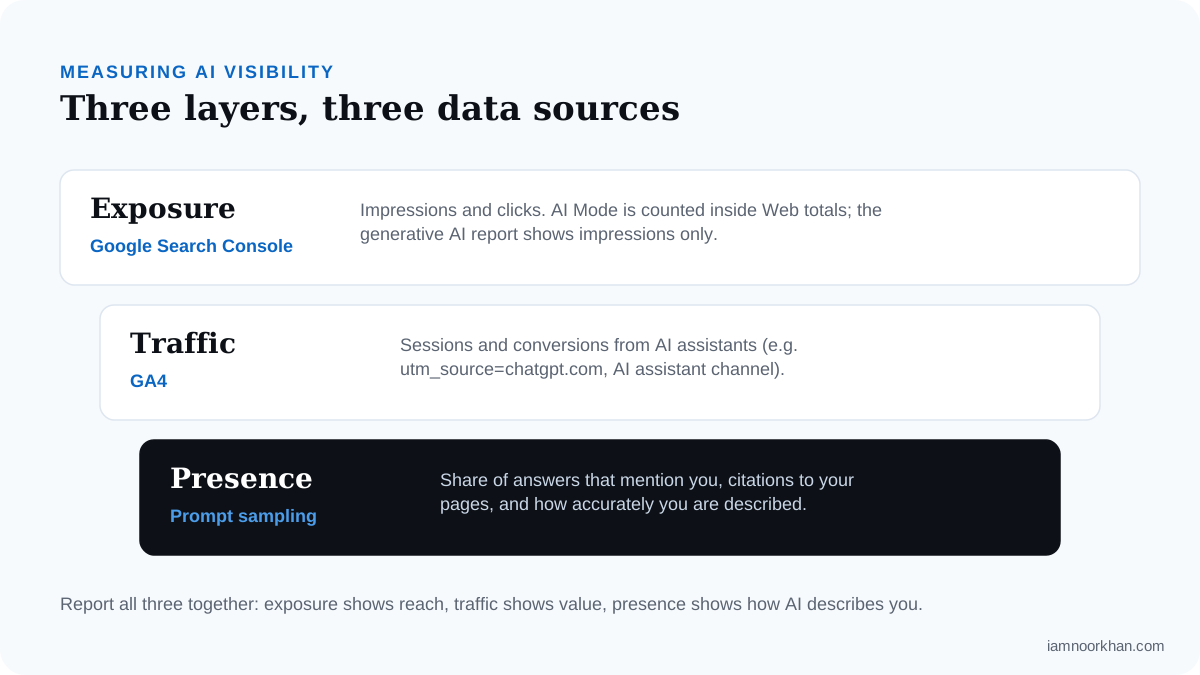
AI visibility is best measured in three layers: exposure in Google, traffic and leads in analytics, and presence inside the answers themselves. No single tool covers all three.
| Layer | Tool | What it shows | What it can't show |
|---|---|---|---|
| Exposure | Google Search Console | Impressions in Google, including AI Overviews and AI Mode | Clicks or queries in the AI-only reports; anything outside Google |
| Traffic | GA4 | Visits and leads from AI assistants that pass a referrer | Clicks from AI Overviews (they look organic); visits without a referrer |
| Presence | Prompt sampling (by hand or with a tool) | Whether you're mentioned, cited and described accurately | Exact reach, because no assistant publishes impression data |
Each layer covers a blind spot in the others. Let's take them one at a time.
What Google Search Console can and can't show
Search Console shows your exposure in Google's AI features, but mostly as impressions, not as a clean AI-only view of clicks.
Two changes matter here:
- AI Mode is blended into your normal totals. Since June 17, 2025, Google's documentation has said that AI Mode clicks, impressions and position count toward the Performance report, inside the regular "Web" search type with no separate filter (reported by Search Engine Journal, 2025).
- Dedicated generative AI reports arrived in 2026. On June 3, 2026, Google introduced Search Generative AI performance reports covering AI Overviews, AI Mode and AI features in Discover, first for a subset of sites and then more widely from June 23. They break impressions down by page, country, date and device. At launch they show impressions only: no clicks, CTR, position or queries, though Google has said more metrics may follow.
Here's how to use that in practice:
- Track AI impressions by page group (services, blog, location pages) in the generative AI report. This is your closest thing to "how often Google's AI showed us."
- Read rising impressions with falling clicks as a pattern, not a failure. This is zero-click search in action. Ahrefs' updated study, using December 2025 data from 300,000 keywords, found that an AI Overview on the page correlated with a 58% lower click-through rate for the top-ranking result. That's a correlation across many keywords, not proof of what happens to any one page, but it explains why clicks alone undersell your visibility.
- Keep conversions as the number that matters. As Peter Rota said on my podcast about what changes in AI search, "If you have a basic foundation of SEO, you're going to get 80% of the way there." Impressions tell you that foundation is being seen; leads tell you it's working.
What GA4 can and can't show
GA4 shows visits and leads from AI assistants when the assistant passes a referrer, and it can't see AI Overview clicks or referrer-less visits at all.
On May 13, 2026, Google added a native AI Assistant channel to GA4's Default Channel Group (reported by Search Engine Journal, 2026). When GA4 recognizes an AI assistant referrer, it sets the medium to ai-assistant and groups the session under that channel. Google names ChatGPT, Gemini and Claude as examples but hasn't published the full list of recognized sources.
That's a good start, but I still recommend a custom channel group so you control what's included:
In GA4, go to Admin → Data display → Channel groups and create a new group (copy the default one so nothing else changes).
Add a channel called AI Referrals with the condition Source matches regex:
.*chatgpt.*|.*openai.*|.*perplexity.*|.*claude.*|.*gemini.*|.*copilot.*Drag AI Referrals above Referral. GA4 assigns each session to the first channel it matches, so if Referral sits higher it will claim these visits.
Mark the actions that matter, such as form submissions and booked calls, as key events, so you can see AI visitors becoming leads.
Compare your custom channel with the native AI Assistant channel for a month. If they differ, check which sources each one is catching.
ChatGPT links often carry a utm_source=chatgpt.com parameter, which helps GA4 attribute those visits even when the referrer is thin. Two blind spots remain, and your report should say so plainly:
- AI Overview clicks look like organic search. Someone who clicks a citation in an AI Overview arrives from google.com, just like any other organic click.
- Some assistant visits arrive with no referrer (for example, from desktop apps or copied links) and land in Direct.
So treat your AI referral number as a floor. And keep it in proportion: Similarweb estimates AI assistants send around 0.32% of all website traffic in 2026. For most businesses that's a small slice that is growing quickly (Adobe recorded 693.4% growth in AI traffic to US retail sites over the 2025 holidays), so report the trend and the conversion rate, not just the volume.
The variance-aware method: share of answers
Share of answers is the percentage of runs, across your question set, in which an assistant mentions your brand. It's the presence metric that holds up when individual answers keep changing.
Here's the method:
- Write a fixed question set. Choose 10–15 questions your buyers actually ask before choosing someone like you. Mix recommendation, problem, comparison and brand questions (examples below). Then freeze the list, because changing questions every month breaks the trend.
- Choose the assistants that matter to your buyers. For most of my clients that's ChatGPT (with search on) and Google's AI Overviews or AI Mode, then Perplexity or Gemini if time allows.
- Run each question 3–5 times per assistant. Use a fresh chat each time, logged out or in a clean session where possible, so your history doesn't steer the answer.
- Log four things per run: mentioned (yes/no), cited with a link to your site (yes/no), described accurately (yes/no/partly), and which competitors and sources were named.
- Report percentages, not anecdotes. "Mentioned in 9 of 36 runs (25%)" is a measurement. "ChatGPT recommended us on Tuesday" is a story.
Accuracy deserves extra care in health. If you work in healthcare, an assistant describing your services, insurance or levels of care wrongly isn't just a branding problem. It can mislead someone at a vulnerable moment. For my healthcare SEO clients, accuracy is the first column I read.
A sample question set
Here's a starting set for a healthcare SEO consultant. Adapt it to your own buyers.
| # | Question | Type |
|---|---|---|
| 1 | Who are the best SEO consultants for addiction treatment centers? | Recommendation |
| 2 | How can a rehab center get more admissions from Google? | Problem |
| 3 | What is a topical map in SEO? | Concept |
| 4 | Semantic SEO vs traditional SEO: which is better? | Comparison |
| 5 | How do I get my clinic recommended by ChatGPT? | Problem |
| 6 | What does Noor Khan do? | Brand accuracy |
Be honest about sample size
A small monthly check is directional: it shows which way things are moving and where the problems are, but it isn't precise enough to justify big budget decisions on its own.
In its August 2026 guidance, Measuring Visibility in the AI Era, the IAB separates "directional" measurement from "decision-grade" measurement and describes fewer than 50 queries as exploratory, a step below directional (reported by AdExchanger, 2026). The IAB itself frames this as guidance rather than a formal standard, because AI search is still changing quickly.
What that means for you:
- 10–15 questions, run 3 times each: perfect for a small business to spot trends, accuracy problems and competitor gaps. Call it directional in your report.
- 50+ prompts across several assistants: closer to decision-grade. At that volume, a tracking tool usually beats doing it by hand.
- Never compare a single month's number to a competitor's screenshot. Compare your own trend over three or more months.
If you outgrow the manual method, tools such as Semrush's AI Visibility Toolkit, Ahrefs Brand Radar, Profound, Peec AI and Otterly.AI automate prompt runs at higher volume. The same principles apply: fixed prompts, repeated runs, percentages.
Your monthly AI visibility scorecard (copy this)
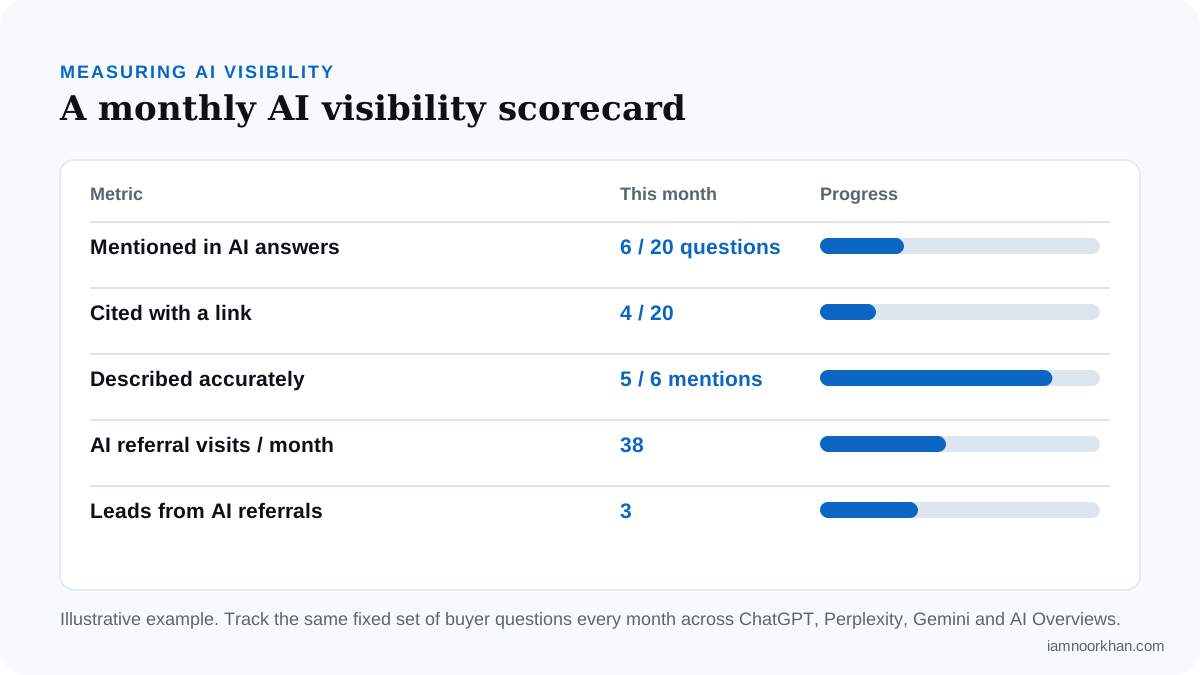
The scorecard is one table with eight rows, each with a clear formula, so anyone on your team can fill it in the same way every month.
| Metric | Formula | Source | Last month | This month | Change |
|---|---|---|---|---|---|
| Share of answers | Runs that mention you ÷ total runs | Prompt sampling | |||
| Citation rate | Runs that link to your site ÷ total runs | Prompt sampling | |||
| Accuracy rate | Accurate mentions ÷ total mentions | Prompt sampling | |||
| Top competitor's share | Runs that mention your main competitor ÷ total runs | Prompt sampling | |||
| AI impressions | Impressions in the generative AI report | Search Console | |||
| AI referral sessions | Sessions in your AI Referrals channel | GA4 | |||
| AI leads | Key events from the AI Referrals channel | GA4 | |||
| AI lead rate | AI leads ÷ AI referral sessions | GA4 |
Add one free-text line underneath: the sources assistants cited most. Those are the sites where your brand needs to appear, a theme I cover in how to get recommended by ChatGPT.
A worked example
Here's how one month might look for a business tracking 12 questions, 3 runs each, in 2 assistants (72 runs in total). These numbers are illustrative, not client data.
| Metric | Calculation | Result |
|---|---|---|
| Share of answers | 18 mentions ÷ 72 runs | 25% |
| Citation rate | 7 linked runs ÷ 72 runs | 10% |
| Accuracy rate | 14 accurate ÷ 18 mentions | 78% |
| Top competitor's share | 31 mentions ÷ 72 runs | 43% |
| AI lead rate | 4 leads ÷ 120 AI sessions | 3.3% |
How I'd read it: the brand is known (one answer in four), but a competitor is named almost twice as often, and four mentions described the services wrongly. My first job would be fixing the accuracy problem (usually inconsistent entity information across the About page, schema and profiles), then earning presence on the sources the competitor is cited from. The 3.3% lead rate says the visitors who do arrive are worth having.
The 2-hour monthly routine
The routine takes about two hours once a month, and doing it at the same point each month is what makes the numbers comparable.
| Step | Time | What to do |
|---|---|---|
| 1. Search Console | 15 min | Export AI impressions by page group from the generative AI report, plus clicks and impressions from the Performance report. |
| 2. GA4 | 15 min | Record AI Referrals sessions, key events and lead rate. Glance at the native AI Assistant channel for comparison. |
| 3. Prompt runs | 60–70 min | Run your fixed questions 3 times each in your main assistants and log mentions, citations, accuracy and competitors. |
| 4. Scorecard | 10 min | Fill in the formulas and the month-on-month change. |
| 5. Actions | 10–15 min | Write two or three examples of how assistants described you and the actions you'll take next. |
Keep the report to one page. Decision-makers need the trend, two or three real examples and the plan, not every raw answer.
How to read the results and what to do next
Each pattern in the scorecard points to a different fix, so read them as a diagnosis, not a grade.
- Rarely mentioned: check that assistants can crawl your site, that your positioning is clear and that you have pages that genuinely answer the questions. An SEO audit is the right starting point.
- Mentioned but described wrongly: your brand information is inconsistent across the web. Fix the About page, structured data and profiles first.
- Mentioned but rarely cited: assistants know you from third-party sources, but your own pages don't answer the question well. Restructure them answer-first.
- Impressions up, clicks down: expected with AI Overviews. Check that leads are holding, and that your pages give people a reason to click through.
- Cited, but few leads: the landing page isn't converting AI visitors. Add a clear next step that matches what they asked.
One more piece of honesty: some research suggests being cited helps. Seer Interactive's 2025 study found brands cited in AI Overviews earned 35% more organic clicks than those that weren't. That's a correlation, and brands strong enough to be cited are often strong in other ways too, so treat it as encouragement rather than a promise. Nobody can guarantee an AI citation, and you should be wary of anyone who does.
Start small, stay consistent
You don't need an enterprise platform to start measuring AI visibility. You need a fixed set of questions, a few runs each, the two free Google tools you probably already have, and the patience to watch the trend for three months before drawing conclusions.
The measurement is also what turns generative engine optimization from guesswork into a process. It's the same foundation behind results like Olympic Behavioral Health's +300% organic conversions: knowing what's being seen, and what turns into enquiries.
If you'd like help setting this up, or want to know where you stand today, my AI search optimization service builds the measurement and the improvements together. Or start with a free gap snapshot and I'll show you how assistants currently describe your business.
Frequently asked questions
How do I measure my brand's visibility in AI search?
Combine three sources: Google Search Console for impressions in AI features, GA4 for visits and leads from AI assistants, and a fixed set of buyer questions you run in each assistant every month. Run each question several times and report the share of answers that mention, cite and accurately describe you. Watch the trend across months rather than any single result.
Can I track ChatGPT traffic in Google Analytics 4?
Yes, partly. Since May 2026 GA4 has a native AI Assistant channel that groups visits from recognized assistants such as ChatGPT, Gemini and Claude, and you can add a custom channel group with a source regex to catch more. Visits that arrive without a referrer still land in Direct, so treat the number as a floor, not the full picture.
Does Google Search Console show AI Overviews data?
Yes. AI Mode clicks and impressions have been counted in the Performance report's Web totals since June 2025, and in June 2026 Google launched dedicated generative AI performance reports covering AI Overviews, AI Mode and Discover. Those reports currently show impressions only, with no clicks, queries or position.
Why does ChatGPT give different answers to the same question?
AI assistants generate each answer fresh, so the brands named, their order and the length of the list change from run to run. SparkToro and Gumshoe's 2026 research found less than a 1 in 100 chance of getting the same brand list twice. That's why you should run each question several times and measure how often you appear, not where you rank.
How many prompts do I need to track AI visibility?
IAB's 2026 guidance describes fewer than 50 queries as exploratory, meaning useful for spotting patterns but not for budget decisions. A small business can start with 10 to 15 questions run three times each to watch direction, then move to 50 or more prompts, usually with a tracking tool, when the numbers need to support spending decisions.
How often should I check AI search visibility?
Monthly is enough for most businesses. Weekly checks mostly capture the natural randomness of AI answers, while a consistent monthly check on the same questions shows whether you're really gaining ground.
Keep reading
 AI Search
How to Get Your Business Recommended by ChatGPT and AI Assistants
If you've watched competitors get named by ChatGPT while your business doesn't come up, you're not doing anything wrong. You just can't see how these answers get put together yet. This guide shows you how they work and what you can actually control.
· 12 min read
AI Search
How to Get Your Business Recommended by ChatGPT and AI Assistants
If you've watched competitors get named by ChatGPT while your business doesn't come up, you're not doing anything wrong. You just can't see how these answers get put together yet. This guide shows you how they work and what you can actually control.
· 12 min read
 Healthcare SEO
Addiction Treatment SEO: How Rehab Centers Win Admissions from Search
The people searching for treatment are often frightened, exhausted and searching on behalf of someone they love. This guide shows how a rehab center earns their trust in search, honestly and within the rules.
· 12 min read
Healthcare SEO
Addiction Treatment SEO: How Rehab Centers Win Admissions from Search
The people searching for treatment are often frightened, exhausted and searching on behalf of someone they love. This guide shows how a rehab center earns their trust in search, honestly and within the rules.
· 12 min read