AI Crawlers and robots.txt: Which Bots to Allow or Block (With Copy-Paste Templates)
Blocking the wrong AI bot can quietly remove you from ChatGPT or Perplexity answers. Here's what each crawler does, how to decide for your business, three copy-paste robots.txt setups, and how to check it's working.
 By Noor Khan
Key takeaways
- AI companies run different bots for different jobs: training, search indexing and fetching pages for a user. Decide on each separately.
- To appear in AI search answers, allow the search bots (OAI-SearchBot, Claude-SearchBot, PerplexityBot) plus Googlebot and Bingbot.
- Blocking training bots (GPTBot, ClaudeBot, Google-Extended, Applebot-Extended, CCBot) doesn't remove you from AI search, but it's a trade-off for brands that want to be known.
- Google-Extended doesn't affect Google Search or AI Overviews. Those use Googlebot; Search Console's Search generative AI setting is the control for them.
- robots.txt is a request, not a lock. Check your CDN and firewall, verify bots in your logs, and use the free templates and audit prompt below.
Part of the AI Search Optimization: The Practical Guide to Getting Found, Cited and Recommended (2026) series.
Here's a scenario that's more common than you'd think. A business works hard on its content, wonders why ChatGPT and Perplexity never mention it, and then discovers that a security plugin or a CDN setting has been blocking every AI crawler for a year.
The opposite happens too: someone blocks "AI" in a panic, not realizing that the same rule removed them from the AI search answers where their customers now look.
Both mistakes have become easier to make. Since July 2025, Cloudflare, which sits in front of a large share of the web, has blocked known AI crawlers by default on new domains unless the owner allows them. Many site owners never saw the setting.
The fix starts with one idea: AI companies run several different bots, and they do different jobs. Once you see that, the decisions become simple.
The three kinds of AI crawler
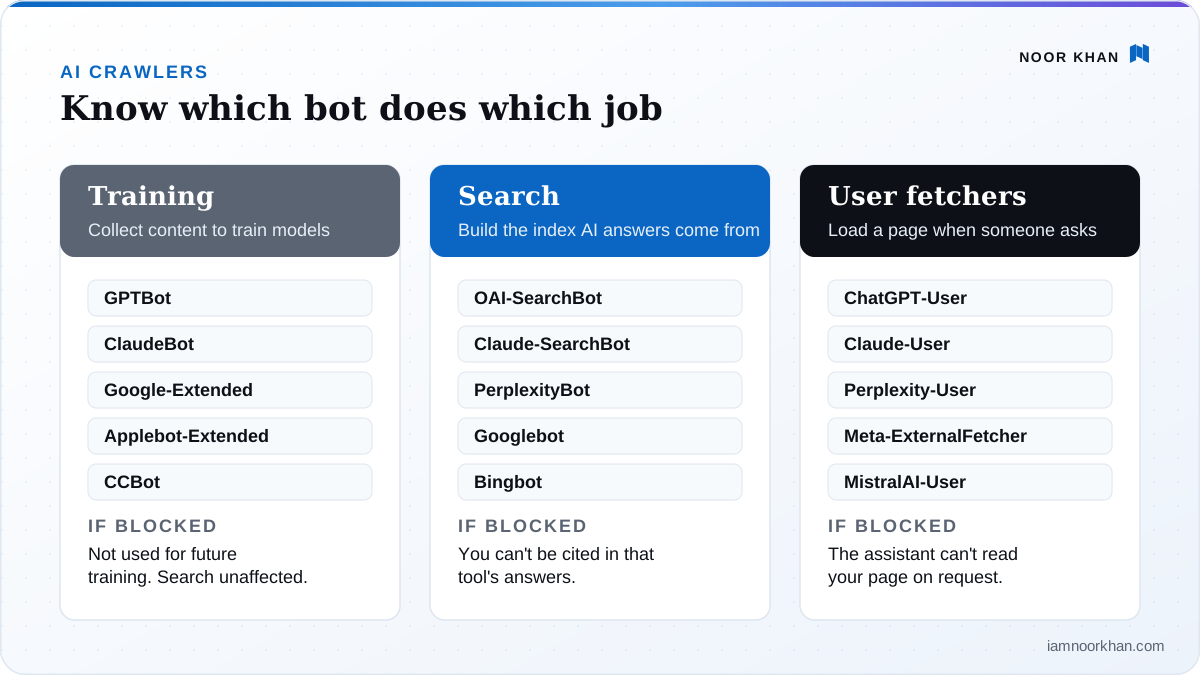
| Type | What it does | If you block it |
|---|---|---|
| Training crawlers | Collect content to train AI models | Your content isn't used for future training. Search visibility is unaffected, but future models may know less about you. |
| Search crawlers | Build the index AI search tools answer from | You can't be cited or recommended in that tool's search answers. |
| User fetchers | Load a page when a user asks the assistant about it or shares a link | The assistant can't read your page when someone asks for it directly. |
Most businesses want to be found in AI search and are neutral or cautious about training. That means: allow search crawlers and user fetchers, then make a deliberate choice on training.
How to decide: a quick framework by business type
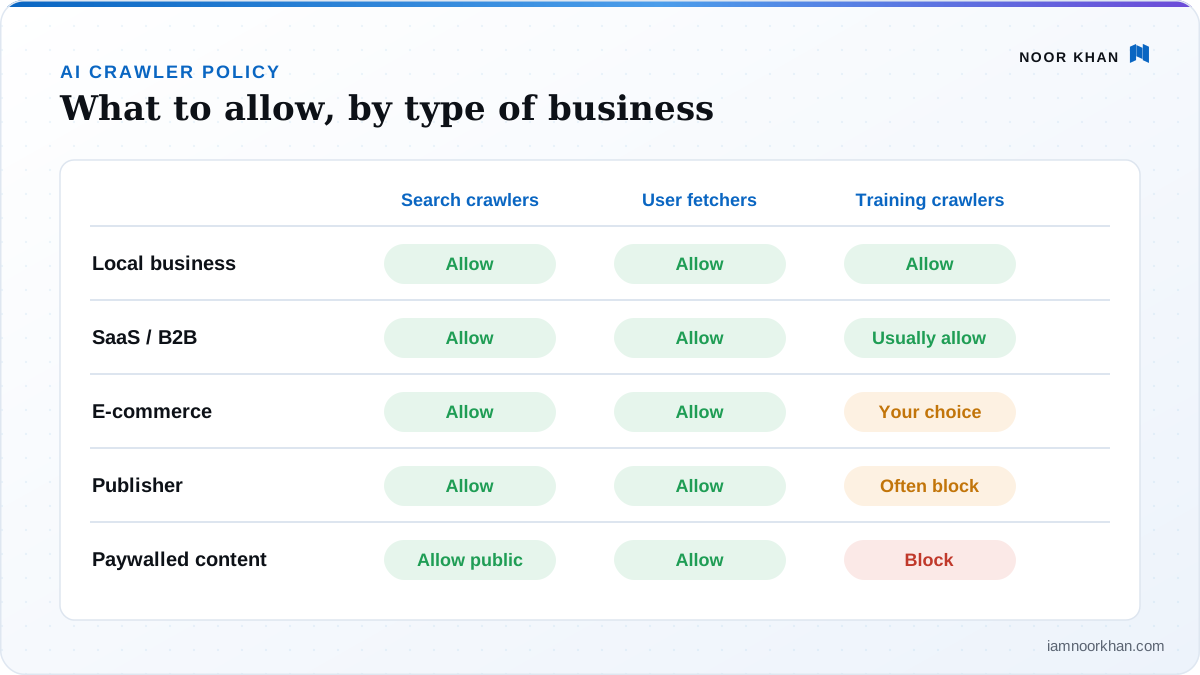
| Your situation | Search crawlers | User fetchers | Training crawlers | Why |
|---|---|---|---|---|
| Local business or service provider | Allow | Allow | Allow | You want to be known and recommended; your content isn't the product |
| SaaS or B2B company | Allow | Allow | Usually allow | Documentation and comparisons shape what AI says about you |
| E-commerce store | Allow | Allow | Your choice | Product pages benefit from AI visibility; protect unique content if needed |
| Publisher or content business | Allow | Allow | Often block | Your content is what you sell; keep search visibility, limit training |
| Paywalled or members-only content | Allow public pages | Allow | Block | Protect premium content; keep public pages discoverable |
| Sensitive or private content | Block those paths | Block those paths | Block | Use authentication, not robots.txt, for anything truly private |
One principle runs through all of it: robots.txt is for managing well-behaved crawlers, not for security. If content must not be accessed, put it behind a login.
The AI crawler list (2026)
Names are the user-agent tokens you use in robots.txt. Companies add and rename bots occasionally, so check their documentation once a year. Useful references: OpenAI's bots and Google's crawler list.
OpenAI (ChatGPT)
| Bot | Type | Notes |
|---|---|---|
OAI-SearchBot |
Search | Powers ChatGPT search. Allow it to appear in answers. |
ChatGPT-User |
User fetcher | Fetches pages for user requests. |
GPTBot |
Training | Blocking it doesn't affect ChatGPT search. |
Anthropic (Claude)
| Bot | Type | Notes |
|---|---|---|
Claude-SearchBot |
Search | Improves Claude's search results. |
Claude-User |
User fetcher | Fetches pages when a Claude user asks. |
ClaudeBot |
Training | Collects data for model training. |
| Bot | Type | Notes |
|---|---|---|
Googlebot |
Search | Powers Google Search, including AI Overviews and AI Mode. Never block it unless you want to leave Google. |
Google-Extended |
Training and grounding token | Controls use in Gemini models and grounding outside Search. Doesn't affect Search ranking or AI Overviews. |
To keep your site out of AI Overviews and AI Mode specifically, don't use robots.txt: use Search Console → Settings → Search generative AI. Google says that setting doesn't affect regular ranking.
Microsoft (Bing and Copilot)
| Bot | Type | Notes |
|---|---|---|
Bingbot |
Search | Powers Bing and the index Copilot answers from. Allow it. |
Bing has also said it respects page-level noarchive and nocache meta tags to limit how content is used in its AI answers. Check Bing's webmaster documentation for the current behavior before relying on it.
Perplexity
| Bot | Type | Notes |
|---|---|---|
PerplexityBot |
Search | Builds Perplexity's index. Allow it to be cited. |
Perplexity-User |
User fetcher | Fetches pages for user questions. |
Apple
| Bot | Type | Notes |
|---|---|---|
Applebot |
Search | Powers Siri and Spotlight suggestions. |
Applebot-Extended |
Training token | Opts content out of Apple's AI training. Doesn't affect Applebot search. |
Others you'll see in logs
| Bot | Company | Type |
|---|---|---|
Meta-ExternalAgent |
Meta | Training |
Meta-ExternalFetcher |
Meta | User fetcher |
Amazonbot |
Amazon | Search and AI features |
DuckAssistBot |
DuckDuckGo | AI answers |
MistralAI-User |
Mistral | User fetcher |
CCBot |
Common Crawl | Open dataset widely used for training |
Bytespider |
ByteDance | Training |
Three copy-paste robots.txt setups
Pick the one that matches your goal. Each goes in the robots.txt file at the root of your domain (yourdomain.com/robots.txt). Keep your existing rules for other bots and your Sitemap: line. Each one is also available as a plain text file you can download.
Setup A: Maximum visibility (best for most businesses)
Everything allowed. Best if you want to be cited and recommended as widely as possible and you're comfortable with training use. Download setup A.
User-agent: *
Allow: /

Sitemap: https://yourdomain.com/sitemap.xml
That's genuinely all you need: User-agent: * covers every well-behaved bot. Add explicit Allow groups for important AI bots only if another rule elsewhere in your file blocks them.
Setup B: Visible in AI search, opted out of training
Allows search crawlers and user fetchers, blocks the main training crawlers. A balanced choice for publishers and content-heavy businesses. Download setup B.
# Search engines and AI search: allowed
User-agent: *
Allow: /

# AI training: blocked
User-agent: GPTBot
Disallow: /

User-agent: ClaudeBot
Disallow: /

User-agent: Google-Extended
Disallow: /

User-agent: Applebot-Extended
Disallow: /

User-agent: Meta-ExternalAgent
Disallow: /

User-agent: CCBot
Disallow: /

User-agent: Bytespider
Disallow: /

Sitemap: https://yourdomain.com/sitemap.xml
OAI-SearchBot, ChatGPT-User, Claude-SearchBot, Claude-User, PerplexityBot, Googlebot and Bingbot all stay allowed through the * group.
Setup C: Block all AI (understand the trade-off)
Only choose this if protecting your content matters more than appearing in AI answers. You'll disappear from ChatGPT search, Claude and Perplexity answers. Google AI Overviews are unaffected (they use Googlebot), and so is Copilot (Bingbot). Download setup C.
User-agent: *
Allow: /

User-agent: GPTBot
User-agent: OAI-SearchBot
User-agent: ChatGPT-User
User-agent: ClaudeBot
User-agent: Claude-SearchBot
User-agent: Claude-User
User-agent: PerplexityBot
User-agent: Perplexity-User
User-agent: Google-Extended
User-agent: Applebot-Extended
User-agent: Meta-ExternalAgent
User-agent: Meta-ExternalFetcher
User-agent: CCBot
User-agent: Bytespider
User-agent: Amazonbot
Disallow: /

Sitemap: https://yourdomain.com/sitemap.xml
Several User-agent lines followed by one rule is valid robots.txt: the rule applies to all of them.
Partial rules: allow the site, protect one section
You don't have to choose all or nothing. To keep AI search access everywhere but stop training on, say, your premium articles:
User-agent: GPTBot
User-agent: ClaudeBot
User-agent: Google-Extended
Disallow: /premium/

User-agent: *
Allow: /
Five robots.txt mistakes to avoid
- Blocking search crawlers when you meant to block training. The most common and most costly mistake. Check OAI-SearchBot and PerplexityBot specifically.
- Using
Disallow: /underUser-agent: *on a live site, often left over from a staging environment. It blocks everything, including Google. - Expecting robots.txt to remove content from AI answers immediately. Changes take time to be picked up (OpenAI says about 24 hours), and content already processed isn't instantly forgotten.
- Blocking CSS and JavaScript files. Crawlers need them to render pages properly.
- Treating robots.txt as security. It's public, and it's a request. Anything private needs authentication.
The step everyone forgets: your CDN and firewall
A perfect robots.txt doesn't help if your infrastructure blocks bots before they ever reach it. Check:
- Cloudflare: open the AI crawler and bot settings in your dashboard. Look at "block AI bots" options, managed robots.txt and any AI crawl controls. These can block or override rules for AI crawlers regardless of your own file. Since 2025, Cloudflare also lets you distinguish search, agent and training bots.
- Other CDNs and hosts (Vercel, Netlify, Akamai, Fastly, managed WordPress hosts): look for bot protection, "bot fight" or AI-blocking toggles.
- Security plugins on WordPress (firewalls, rate limiters) sometimes block unfamiliar user agents.
- Rate limits: aggressive limits can block crawlers that request many pages quickly. Rate-limit rather than block if load is a concern.
The quickest test: ask ChatGPT (with search on) or Perplexity to "summarize the page at [your URL]". If it says it can't access the page, something is blocking it.
robots.txt is a request, not a lock
The major AI companies say their declared crawlers respect robots.txt. But not every bot behaves. In August 2025, Cloudflare published evidence that Perplexity used undeclared crawlers, disguised as a regular browser, to access sites that had blocked its declared bots. Cloudflare responded by de-listing it as a verified bot and adding rules to block the behavior.
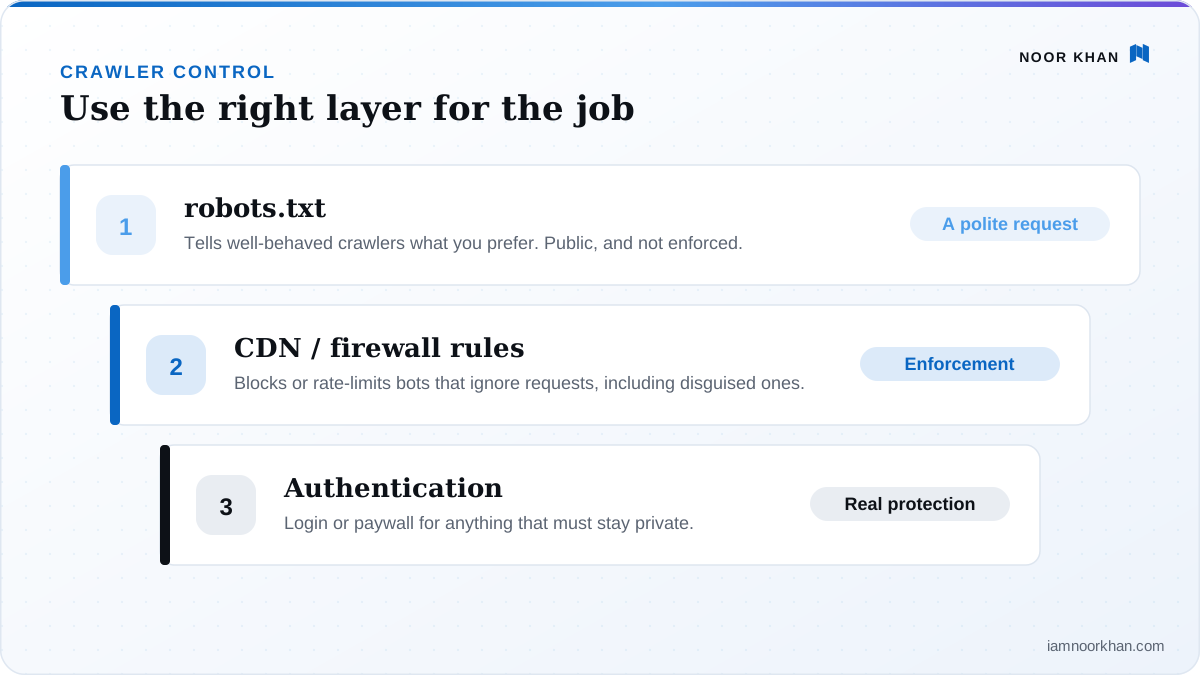
The lesson isn't to panic. It's to use the right tool for each job:
- robots.txt to tell well-behaved crawlers what you prefer.
- Firewall or CDN rules to enforce blocks on bots that matter to you.
- Authentication for anything that must stay private.
How to check it's working
1. Validate your file
Open yourdomain.com/robots.txt in a browser and check it looks right. Google Search Console's robots.txt report shows how Google reads it and flags errors.
2. Check your server logs
If you have access to your server logs, these commands count visits from the main AI crawlers (Linux/Mac; adjust the log path for your server):
grep -ioE "OAI-SearchBot|ChatGPT-User|GPTBot|Claude-SearchBot|Claude-User|ClaudeBot|PerplexityBot|Perplexity-User|Google-Extended|bingbot|Googlebot" /var/log/nginx/access.log | sort | uniq -c | sort -rn
And to see which status codes each one gets (you want mostly 200):
grep -i "OAI-SearchBot" /var/log/nginx/access.log | awk '{print $9}' | sort | uniq -c
Many 403 or 429 responses for a bot you allowed means your firewall or rate limiter is blocking it.
3. Verify important bots
User agents can be faked. To confirm a visitor really is who it claims:
- Googlebot: Google explains how to verify Googlebot with a reverse DNS lookup.
- Bingbot: use Bing's Verify Bingbot tool.
- OpenAI: compare IP addresses against OpenAI's published ranges, such as searchbot.json for OAI-SearchBot.
4. Give it time
OpenAI says robots.txt changes take about 24 hours to take effect; others are similar or slower. Re-test after a few days.
A note on llms.txt
You'll see advice to add an llms.txt file "for AI". It's a proposed format for giving AI tools a curated, Markdown map of your site. It's harmless and quick to create, but be realistic: Google has said it doesn't use it for Search, and no major AI search product has committed to relying on it. Treat it as a nice-to-have, never a substitute for crawl access. More in the llms.txt glossary entry.
Free prompt: audit your robots.txt
Paste your current robots.txt into ChatGPT, Claude or Gemini with this prompt:
You are a technical SEO specialist. Here is my website's robots.txt file:
"""
[paste robots.txt]
"""

About my site: [type of business, e.g. local service / SaaS / e-commerce / publisher]
My goal: [choose one: maximum AI visibility / visible in AI search but opted out of AI training / block all AI]
Sections I want to protect (optional): [paths, e.g. /premium/]

1. For each of these bots, tell me whether this file allows or blocks it, and quote the rule responsible: Googlebot, Bingbot, OAI-SearchBot, ChatGPT-User, GPTBot, Claude-SearchBot, Claude-User, ClaudeBot, PerplexityBot, Perplexity-User, Google-Extended, Applebot, Applebot-Extended, Meta-ExternalAgent, CCBot.
2. Point out every rule that conflicts with my goal, especially any that accidentally block search crawlers or Googlebot.
3. Flag syntax errors, rules that don't do what they appear to do, and blocked CSS or JavaScript.
4. Give me a corrected robots.txt that matches my goal, keeps my existing rules for non-AI bots and my Sitemap line, and protects the sections I listed.
5. Explain each change in one sentence, and remind me of anything robots.txt can't do (for example, things I'd need to change in my CDN or firewall).
AI crawler checklist
- Decided on a policy for search, user and training crawlers (framework above)
- robots.txt matches that policy (setup A, B or C)
- OAI-SearchBot, PerplexityBot and Claude-SearchBot not blocked (unless intended)
- Googlebot and Bingbot allowed; CSS and JavaScript not blocked
- CDN and firewall AI-bot settings checked
- Logs show allowed bots getting
200responses - Search Console → Settings → Search generative AI set as intended
- Re-checked after 24–72 hours
Keep going
- What to do once crawlers can reach you: AI search optimization: the practical guide
- ChatGPT specifically: How to get your business recommended by ChatGPT
- Google's AI features: How to get cited in Google AI Overviews and AI Mode
Not sure what your site is blocking? Send it over for a free written gap snapshot and I'll check crawler access as part of it. It's part of every technical SEO review I do.
Frequently asked questions
Should I block AI crawlers?
Most businesses shouldn't block AI search crawlers, because that makes them invisible in ChatGPT search, Perplexity and Claude answers. Blocking training crawlers is a separate decision: it protects content from being used in model training, at the cost of future models knowing less about you. Publishers whose content is the product often block training; businesses that want to be recommended usually allow it.
Does blocking GPTBot remove my site from ChatGPT?
No. GPTBot is OpenAI's training crawler. ChatGPT search uses OAI-SearchBot, and ChatGPT-User fetches pages when a user asks. You can block GPTBot and still appear in ChatGPT search answers by allowing OAI-SearchBot.
Does Google-Extended stop my content appearing in AI Overviews?
No. Google-Extended controls whether your content is used for training and grounding in Google's Gemini models outside Search. AI Overviews and AI Mode are part of Google Search and use Googlebot. To exclude your site from them, use Settings, Search generative AI in Search Console.
Do AI crawlers respect robots.txt?
The major companies say their declared crawlers follow robots.txt, though user-initiated fetchers can be treated differently. Enforcement is another matter: in 2025 Cloudflare reported that Perplexity used undeclared crawlers to access sites that had blocked it. For bots you really want to stop, use firewall or CDN rules, not robots.txt alone.
Is it safe to allow AI crawlers? Will they slow down my site?
For most sites, allowing the major AI crawlers is safe and the load is modest. If a bot requests pages aggressively, rate-limit it at your CDN or firewall rather than blocking it outright, and check your logs to see which bots are actually responsible.
How do I check which AI bots visit my site?
Look at your server or CDN logs for the user-agent names in this guide; Cloudflare and some hosts show AI crawler activity in a dashboard. Because user agents can be faked, verify important bots against the IP ranges or verification methods their companies publish.
Do I need llms.txt?
It's optional. llms.txt is a proposed format for giving AI tools a curated map of your site. Google has said it doesn't use it for Search, and no major AI search product has committed to relying on it. It's harmless and quick to add, but it's never a substitute for allowing crawlers.
Keep reading
 AI Search
How to Get Cited in Google AI Overviews and AI Mode (A Practical Playbook)
Google has now said clearly what AI Overviews and AI Mode need. This playbook turns it into steps: eligibility checks, finding your opportunities, covering fan-out questions, rewriting pages so they get quoted, and tracking the results.
· 14 min read
AI Search
How to Get Cited in Google AI Overviews and AI Mode (A Practical Playbook)
Google has now said clearly what AI Overviews and AI Mode need. This playbook turns it into steps: eligibility checks, finding your opportunities, covering fan-out questions, rewriting pages so they get quoted, and tracking the results.
· 14 min read
 AI Search
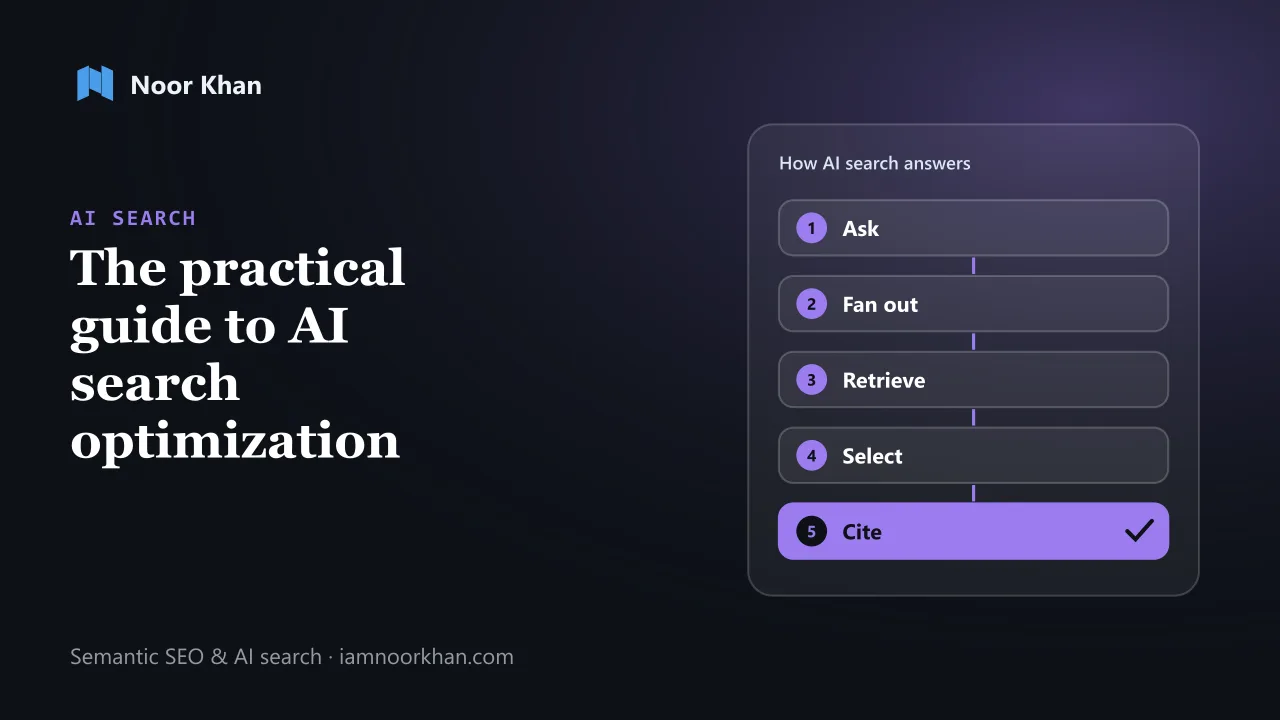
 Optimization: The Practical Guide to Getting Found, Cited and Recommended (2026)
How AI search tools choose their sources, what the research and Google's own guidance say actually works, and a 30-day plan, free checklist and audit prompt to get your brand found, cited and recommended.
· 16 min read
AI Search
AI Search Optimization: The Practical Guide to Getting Found, Cited and Recommended (2026)
How AI search tools choose their sources, what the research and Google's own guidance say actually works, and a 30-day plan, free checklist and audit prompt to get your brand found, cited and recommended.
· 16 min read