How to Get Cited in Google AI Overviews and AI Mode (A Practical Playbook)
Google has now said clearly what AI Overviews and AI Mode need. This playbook turns it into steps: eligibility checks, finding your opportunities, covering fan-out questions, rewriting pages so they get quoted, and tracking the results.
 By Noor Khan
Key takeaways
- AI Overviews and AI Mode use Google's normal index and ranking systems. A page must be indexed and eligible for a snippet. There's no special markup, file or paid route into organic citations.
- AI Mode fans one question out into many searches. Pages that answer the follow-up questions get more chances to be cited, even if they don't rank for the main query.
- Google quotes passages, not pages. Sections that answer their heading in the first sentence, with specifics, are the ones that get lifted.
- Find your opportunities in the new Generative AI performance report in Search Console, and check Settings → Search generative AI is on.
- Use the free opportunity tracker, fan-out prompt and page audit prompt below to work through your most valuable pages one by one.
Part of the AI Search Optimization: The Practical Guide to Getting Found, Cited and Recommended (2026) series.
There's a moment every site owner recognizes now. You search for something you've written a great page about, and Google answers it in an AI Overview, citing three other sites. You rank. You just weren't chosen.
The stakes are real. Ahrefs' 2026 analysis of 300,000 keywords found that when an AI Overview appears, the top-ranking page gets a 58% lower click-through rate on average. Pew Research found that clicks on the links inside AI summaries happened in only about 1% of visits. So the question isn't only "how do I rank?" It's "how do I become one of the sources Google names, and make that worth something?"
The good news: Google has become unusually open about how this works. In 2026 it published a dedicated guide to its generative AI features, launched a Search Console report for them, and added a setting to control them. This playbook turns that guidance into steps you can take, page by page.
AI Overviews vs AI Mode: what's the difference?
AI Overviews are AI-generated summaries that appear at the top of regular Google results; AI Mode is a separate, conversational search experience where the whole results page is an AI answer with follow-up questions. Both are built on Google's index and quality systems, and both link to sources.
| AI Overviews | AI Mode | |
|---|---|---|
| Where it appears | Top of normal search results | Its own tab or mode, conversational |
| Typical query | Informational questions | Complex, multi-part and follow-up questions |
| Query fan-out | Used | Used heavily |
| Sources shown | A few links, inline and in a side panel | More links, inline and in a source list |
| In Search Console | Performance report (Web) + Generative AI report | Same |
In practice, optimize for both at once: the same pages and passages get cited in each. AI Mode just rewards covering a topic more completely, because it explores more sub-questions.
What changed in 2026 (and why it matters)
Several changes this year affect how sources are shown and measured:
- A Search Console report for AI features. The Generative AI performance report shows how often links to your site appeared in AI Overviews and AI Mode. Google launched it in June 2026 and it reached all sites worldwide on August 31, 2026.
- A control to include or exclude your site. Settings → Search generative AI in Search Console. Sites are included by default.
- More visible attribution. Google has added preferred sources and "highly cited" labels to AI experiences and said more publisher links would appear next to the relevant text.
- Longer AI Overviews for some queries, which can expand into an AI Mode-style answer. More sub-questions answered means more chances for supporting sources to be cited.
The direction is consistent: Google is surfacing more sources, more visibly, and giving site owners data about it. That rewards sites that set up measurement now.
How Google picks sources for AI answers
AI Overviews and AI Mode generate answers from pages in Google's index, using Google's core ranking and quality systems, and link to the pages that support the answer. Two mechanics matter most.
Query fan-out
For many questions, Google's model issues a set of related searches at the same time and gathers results for each. Ask "is a heat pump worth it in a cold climate?" and the system may also look up running costs, performance below freezing, installation prices, rebates and comparisons with gas furnaces.
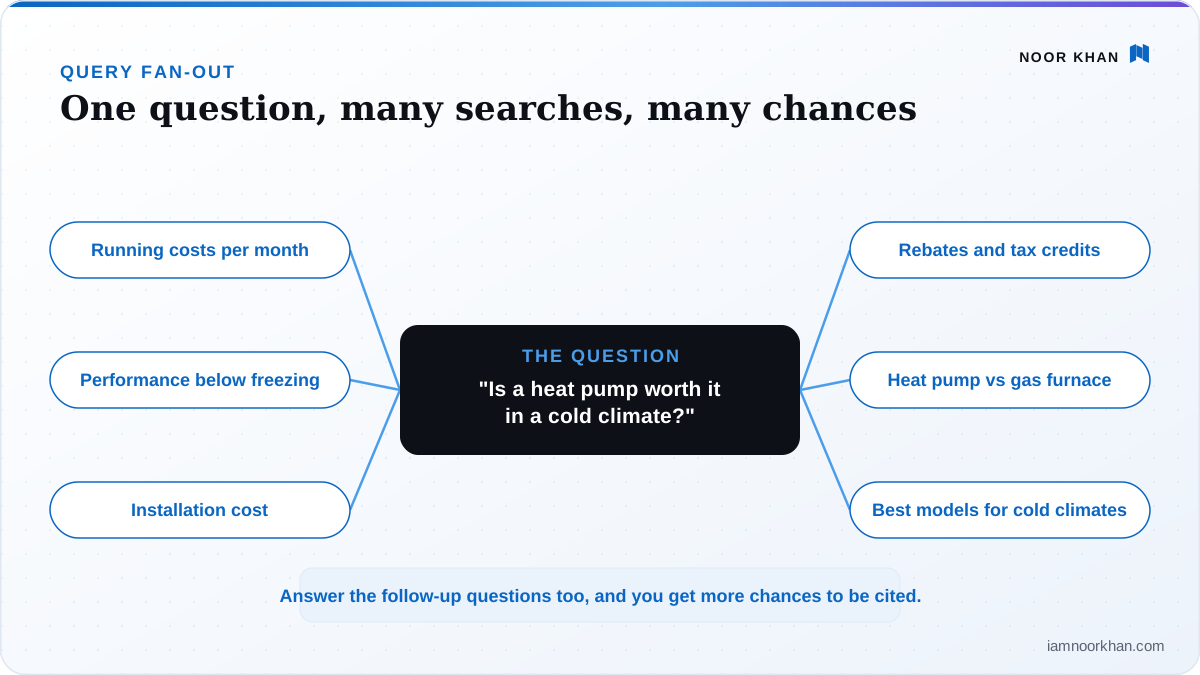
What this means for you: your page can be cited for a sub-question even if it doesn't rank for the main one. That's why analyses keep finding AI citations from pages outside the top ten. Mike King of iPullRank calls each covered sub-query another raffle ticket.
Passage selection
The model picks passages, not whole pages. A brilliant 3,000-word guide still loses if the answer to the specific sub-question is buried in paragraph nine, phrased vaguely, or depends on context from earlier in the article.
Step 1: Make sure you're eligible
Google's rule is short: a page must be indexed and eligible to be shown in Search with a snippet. And, in Google's own words, "Indexing and serving aren't guaranteed." Eligibility gets you into the draw; it doesn't win it.
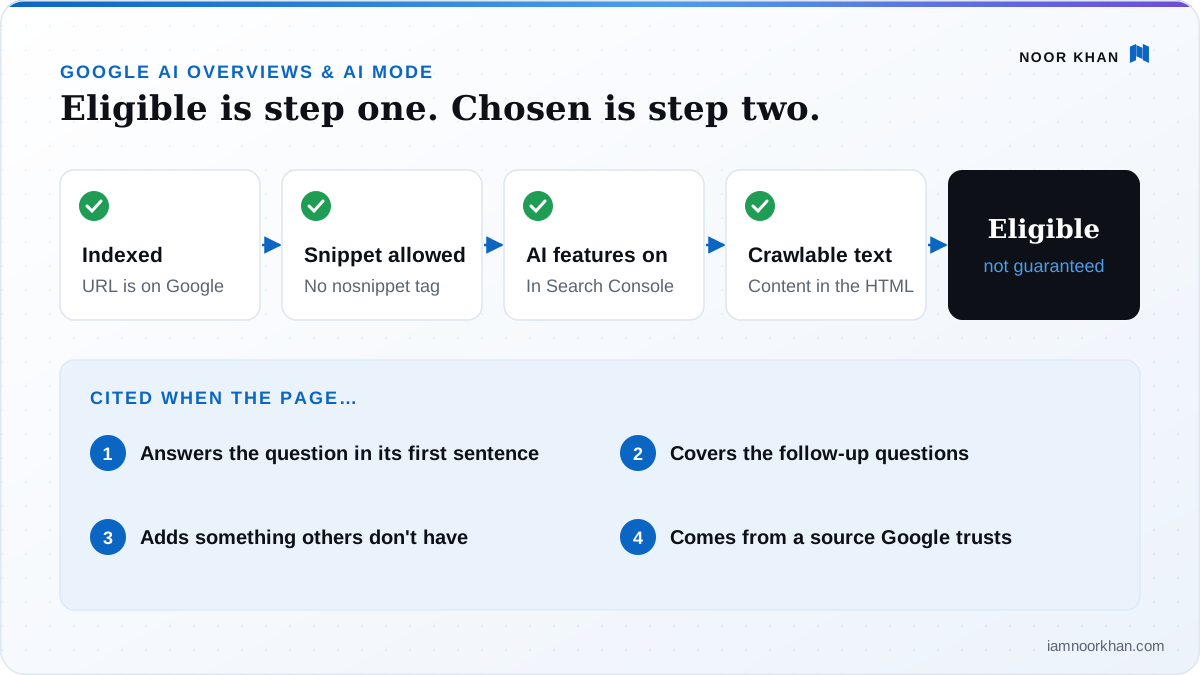
Check these four things first. They explain most "why am I never cited?" cases.
- Indexing. Run URL Inspection in Search Console on your key pages. You want "URL is on Google". If not, check for
noindex, canonical tags pointing elsewhere, or pages Google crawled but chose not to index (often a sign of thin or duplicate content). - Snippet controls. Search your templates and page source for
nosnippet,max-snippet:0anddata-nosnippeton main content. Some themes, plugins and cookie banners add these. They can quietly remove you from AI features. - The Search generative AI setting. In Search Console, open Settings → Search generative AI and confirm your site is included. Google says excluding it doesn't affect regular ranking, so it's easy to miss if someone switched it off.
- Crawlable, rendered text. Important content must be in the rendered HTML, reachable through internal links, and not blocked by robots.txt for Googlebot. Content that only appears after a click, inside images, or in heavy client-side JavaScript is at risk.
What's not on the list: llms.txt, special schema, "AI-friendly" Markdown copies of your pages. Google says you don't need any of them for its AI features.
Step 2: Find your AI Overview opportunities
Don't guess where to start. Use data to find the pages and questions with the most potential.
A. Use the Generative AI performance report
- In Search Console, open Performance → Generative AI performance.
- Set the date range to 3 months and open the Pages tab. Export it.
- Sort your pages into three groups:
- Cited often: protect and strengthen these; they already work.
- Cited sometimes: your best quick wins. Improve the passages that answer the main sub-questions.
- Important pages with no AI impressions: check eligibility (Step 1), then compare them with the sources Google does cite.
B. Check your money queries by hand Search your 20 most valuable queries (in a private window, logged out). For each, note whether an AI Overview appears, which sources are cited, and what those sources offer that your page doesn't.
C. Record it in one sheet Record it in the free opportunity tracker below. It works out a priority score for each query, so the sheet becomes your work queue.
Step 3: Anatomy of a page that gets cited
Before rewriting anything, it helps to know what a citable page looks like. This structure works for most informational and commercial pages:
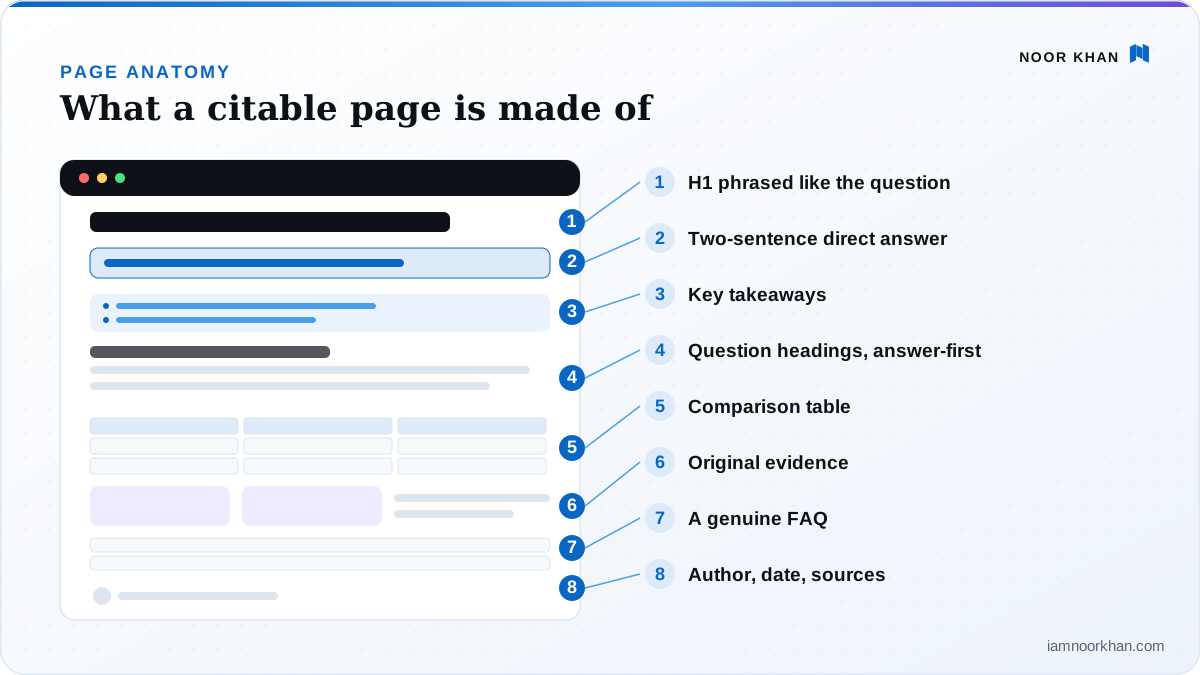
- An H1 phrased like the question ("How long does a kitchen remodel take?").
- A two-sentence answer straight away, with the key number or condition.
- Key takeaways (3–5 bullets) for skimmers and AI summaries alike.
- Sections for the fan-out questions, each heading phrased as a question and each opening with a direct answer.
- A comparison table where the reader is choosing between options.
- Original evidence: your data, a worked example, photos, a short case.
- A genuine FAQ with the follow-ups that didn't fit elsewhere.
- Author, date and sources visible on the page.
You don't need all eight on every page. But a page with none of them is rarely cited.
Step 4: Cover the fan-out questions
Take your main topic and list the follow-up questions a thoughtful buyer would ask next. Then make sure each one has a clear answer somewhere on your site, either on the page or on a closely linked page.
Where to find them:
- Google's "People also ask" and "People also search for" boxes.
- The questions your sales team, support inbox or front desk hears every week.
- AI Mode itself: ask your main question, then look at the follow-ups it suggests and the sources it uses.
- The prompt below, which predicts the sub-questions for you.
How to cover them without spamming:
- Small, closely related questions belong as sections on one comprehensive page.
- Distinct intents (a comparison, a pricing question, a how-to) can earn their own pages, linked together with internal links.
- Never mass-produce near-identical pages for wording variations. Google explicitly warns this can violate its scaled content abuse policy. One strong page beats fifty thin ones.
Free prompt: map the fan-out questions for any query
You are an SEO strategist who understands how Google AI Mode and AI Overviews use query fan-out (running several related searches to build one answer).

Main query: "[your query]"
My audience: [who searches this and why]
My page (paste text or summarize what it currently covers):
"""
[paste]
"""

1. List the 12-15 sub-questions an AI search system would most likely research to answer the main query well. Group them by theme (cost, comparison, how-to, risks, eligibility, timing, alternatives, etc.).
2. For each sub-question, say whether my page answers it: clearly / vaguely / not at all.
3. For each one my page misses or answers vaguely, write the exact heading I should add and the one-sentence direct answer it should open with. Mark any answer that needs data or first-hand experience I must supply, and don't invent numbers.
4. Tell me which sub-questions deserve their own separate page (a distinct intent) and which belong as sections on this page.
5. Finish with a revised outline for my page (H2/H3 only), in the order a reader would want them.
Step 5: Rewrite sections answer-first
This is the highest-impact change for most sites, and it's simple: make the first sentence under every heading a complete answer to that heading. Then add the detail, nuance and evidence underneath.
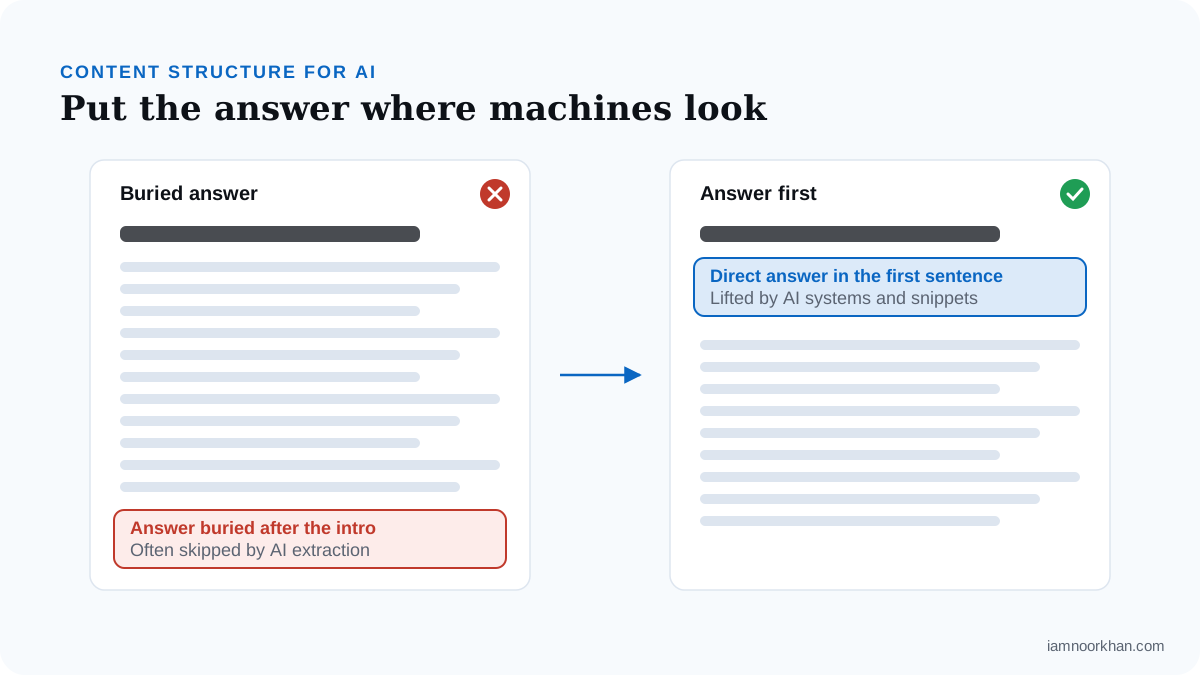
Three examples from different industries:
Home services
Before: "Every kitchen is different, and there are many factors that go into planning a remodel. Over the years we've seen projects of all sizes…"
After: "A typical kitchen remodel takes 6 to 12 weeks from demolition to final inspection; a cosmetic refresh can take 2 to 3 weeks, while a full layout change with permits can run 4 to 6 months."
SaaS
Before: "Our platform offers flexible options designed to scale with your business needs."
After: "Acme has three plans: Free for up to 3 users, Team at $12 per user per month, and Business at $24 per user per month with SSO and audit logs. Annual billing saves 20%."
E-commerce
Before: "Choosing the right running shoe depends on many personal factors."
After: "Choose a stability shoe if your foot rolls inward when you land (overpronation), a neutral shoe if it doesn't, and a cushioned shoe if you run long distances on pavement. A gait check in-store or a wet-foot test at home tells you which you are."
Each "after" can be lifted into an AI answer as-is. Each "before" can only be skipped.
Rules that make rewrites work:
- Phrase headings as the question people ask, in their words.
- Put the key number, range or condition in the first sentence.
- Name the subject explicitly. "This approach" means nothing out of context; "batch cooking" does.
- Use a table for comparisons, a numbered list for processes and a one-sentence definition for "what is" questions.
- Keep your voice. Google says you don't need to write in a special way for AI. Answer-first writing isn't robotic writing; it's respectful writing, and readers benefit most. My guide to structuring content for AI search goes deeper on section length, lists and tables.
Free prompt: rewrite a section answer-first
Rewrite the section below so it's more likely to be quoted accurately in Google AI Overviews and AI Mode, without changing my facts or voice.

Heading: [heading]
Who reads this: [audience]
Section:
"""
[paste section]
"""

Instructions:
1. Write a new first sentence that fully answers the heading on its own, as if it were the only sentence someone read. Include the most important number, range, condition or recommendation from my text.
2. Keep the supporting detail below it, tightened, in a logical order.
3. Replace pronouns and vague references ("this", "it", "the above") with the actual names of things.
4. If a comparison is involved, suggest a small table. If a process is involved, use a numbered list.
5. Don't add facts, numbers or claims that aren't in my text. If a specific detail would make the answer much better, add a note at the end: "To strengthen this, add: …"

Return: the rewritten section, then a one-line explanation of what changed.
Step 6: Add what nobody else has
Google's guide uses a phrase worth remembering: non-commodity content. If ten sites say the same thing, Google can write that answer without crediting any of them in particular. What earns the link is something it can't get elsewhere. Ten ways to add it:
- Your own numbers: averages, ranges and results from your work or customers.
- A first-hand test: "We tried three methods on our own site; here's what happened."
- A worked example with real (or realistic, clearly labeled) figures.
- Original photos or screenshots that show the thing, not stock images.
- A clear recommendation, including when not to choose an option.
- Edge cases and exceptions that generic content skips.
- A comparison table built on criteria buyers actually use.
- A template, calculator or checklist people can use straight away.
- Expert input: a quote or review from someone qualified.
- Sources for every claim you didn't originate. Research on generative engines found that adding citations, quotations and statistics improved visibility in AI answers (Aggarwal et al., 2024).
When two pages are equally relevant, information gain is usually what separates the one that gets cited from the one that doesn't.
Step 7: Strengthen trust signals
AI Overviews draw on Google's quality systems, so the usual E-E-A-T signals still apply, and matter even more on health, money, legal and safety topics:
- A visible author with real credentials and an author page.
- A clear "last updated" date, with real updates behind it.
- Links to sources for claims you didn't originate.
- Consistent facts across your site and your public profiles.
- Structured data that matches the visible page. Google says no special markup is needed for AI features, but structured data still helps it understand your pages.
- High-quality images and video where they help. Google's guide encourages them, and AI Mode increasingly handles visual and multimodal queries.
Step 8: When AI Overviews take your clicks
Sometimes you'll do everything right, get cited, and still see fewer clicks. That's the trade-off the Pew and Ahrefs data describe. Here's how to respond:
- Separate visibility from traffic. Track AI impressions (Generative AI report) alongside clicks. Being named consistently builds the brand searches and direct visits that follow later.
- Give people a reason to click. Summaries satisfy simple questions. Tools, templates, calculators, detailed comparisons, local details, prices and booking pages still earn clicks after the summary.
- Move up the funnel of intent. Pair informational guides with clear links to the commercial pages they relate to, so the visitors you do get have a next step.
- Watch branded search. Rising branded impressions in Search Console are often the delayed payoff of AI visibility.
Step 9: Measure and iterate monthly
- Generative AI performance report: track impressions per page month over month. Rising impressions on rewritten pages tell you the changes are working.
- Performance report, Web search type: AI Mode and AI Overview clicks are included here. Watch click-through rate on pages with AI impressions.
- Manual spot checks: re-run your opportunity tracker queries monthly and note citation changes.
The full setup, including a free tracker, is in How to track your AI search visibility.
Free prompt: full AI Overview readiness audit for one page
Paste this into ChatGPT, Claude or Gemini with the text of a page. It won't predict Google (nothing can), but it's a demanding second pair of eyes on structure and substance.
You are an experienced SEO editor reviewing a web page for how well it can be quoted in Google AI Overviews and AI Mode. Be direct, specific and practical.

Target query: [the main query this page should be cited for]
Audience: [who reads this page and what they want to decide or do]
Top competing pages (optional): [URLs or names]

Page text:
"""
[paste the page text, including headings]
"""

Do the following:
1. Fan-out coverage: list the 10-12 follow-up questions a searcher would likely ask next. Mark each as answered clearly / answered vaguely / missing.
2. Answer-first check: for each H2/H3, say whether the first sentence answers the heading on its own, out of context. Quote any that don't and rewrite them answer-first using only my facts.
3. Information gain: point out every claim that is generic (it could appear on any competitor's page). For each, suggest the specific detail, number, example or first-hand experience that would make it worth citing instead.
4. Out-of-context test: flag pronouns or references that lose meaning when a passage is read alone.
5. Format: suggest where a table, numbered list, definition or image would help a reader decide faster.
6. Trust: note what's missing (author, date, sources, credentials) for a page on this topic.
7. Finish with the 5 highest-impact edits, in priority order, each with the reason.

Don't invent facts, statistics or sources. If something needs data I must provide, say so and describe what data would help.
AI Overviews checklist
- Key pages are indexed (URL Inspection)
- No
nosnippet/max-snippet:0on main content - Search Console → Settings → Search generative AI: included
- Important text is in the rendered HTML, not only in images or late-loading scripts
- Opportunity tracker filled in for your 20 most valuable queries
- Every heading is a question or clear topic, answered in its first sentence
- Main fan-out questions answered on the page or a linked page
- At least one element competitors don't have (data, experience, asset)
- Visible author, updated date and sources for borrowed claims
- Generative AI performance report reviewed monthly
Keep going
- The bigger picture across ChatGPT, Perplexity and Copilot: AI search optimization: the practical guide
- Make sure crawlers can reach you: AI crawlers and robots.txt
- Measure the results: How to measure AI search visibility
If you'd like a second opinion on your own pages, send me your site for a free written gap snapshot. I'll tell you which pages are closest to being cited and what's holding them back.
Frequently asked questions
How does Google choose which sites to cite in AI Overviews?
Google's AI features are built on its core ranking and quality systems. The model searches Google's index, often running several related queries at once (query fan-out), and links to pages whose content supports the answer it writes. Pages that rank for the question or one of its sub-questions, and that answer it clearly and specifically, are the most likely to be cited.
Do I have to rank in the top 10 to appear in an AI Overview?
No. Because of query fan-out, Google can cite a page that ranks for one of the hidden sub-questions rather than the original query. Analyses of AI citations consistently find many sources from outside the top ten for the main query. Ranking well still helps a lot, but it isn't the only route.
Why does my page rank on page one but never get cited in the AI Overview?
Ranking makes a page eligible, but the AI picks the passages that best support its answer. Pages are often passed over because the answer is buried below a long introduction, phrased vaguely, depends on context from elsewhere on the page, or simply repeats what other sources say. Rewrite the relevant section answer-first and add something specific the other sources don't have.
Does structured data help me get into AI Overviews?
Not directly. Google says no special schema is required for its AI features. Structured data is still worth using because it helps Google understand your pages and makes them eligible for rich results, but it won't get a weak page cited.
Can I see AI Overviews traffic in Search Console?
Partly. Clicks and impressions from AI Overviews and AI Mode are included in the regular Performance report under the Web search type, mixed in with other results. The Generative AI performance report, launched in June 2026 and available to all sites since August 31, 2026, shows impressions from those features by page, country and device, but not clicks or queries.
AI Overviews are taking my clicks. What should I do?
First, measure it: compare impressions and clicks for affected pages. Then shift effort toward content that still earns a click after the summary: tools, templates, calculators, detailed comparisons, original data, local and pricing pages, and services. Keep informational pages strong and citable too, because being the named source builds brand awareness that shows up later as branded searches and direct visits.
How do I stop Google using my content in AI Overviews?
Exclude your site in Search Console under Settings, Search generative AI. Google says this removes your site from AI Overviews and AI Mode without affecting regular rankings. Page-level controls like nosnippet, data-nosnippet and max-snippet also limit what can be shown, but they affect regular snippets too.
Keep reading
 AI Search
AI Crawlers and robots.txt: Which Bots to Allow or Block (With Copy-Paste Templates)
Blocking the wrong AI bot can quietly remove you from ChatGPT or Perplexity answers. Here's what each crawler does, how to decide for your business, three copy-paste robots.txt setups, and how to check it's working.
· 9 min read
AI Search
AI Crawlers and robots.txt: Which Bots to Allow or Block (With Copy-Paste Templates)
Blocking the wrong AI bot can quietly remove you from ChatGPT or Perplexity answers. Here's what each crawler does, how to decide for your business, three copy-paste robots.txt setups, and how to check it's working.
· 9 min read
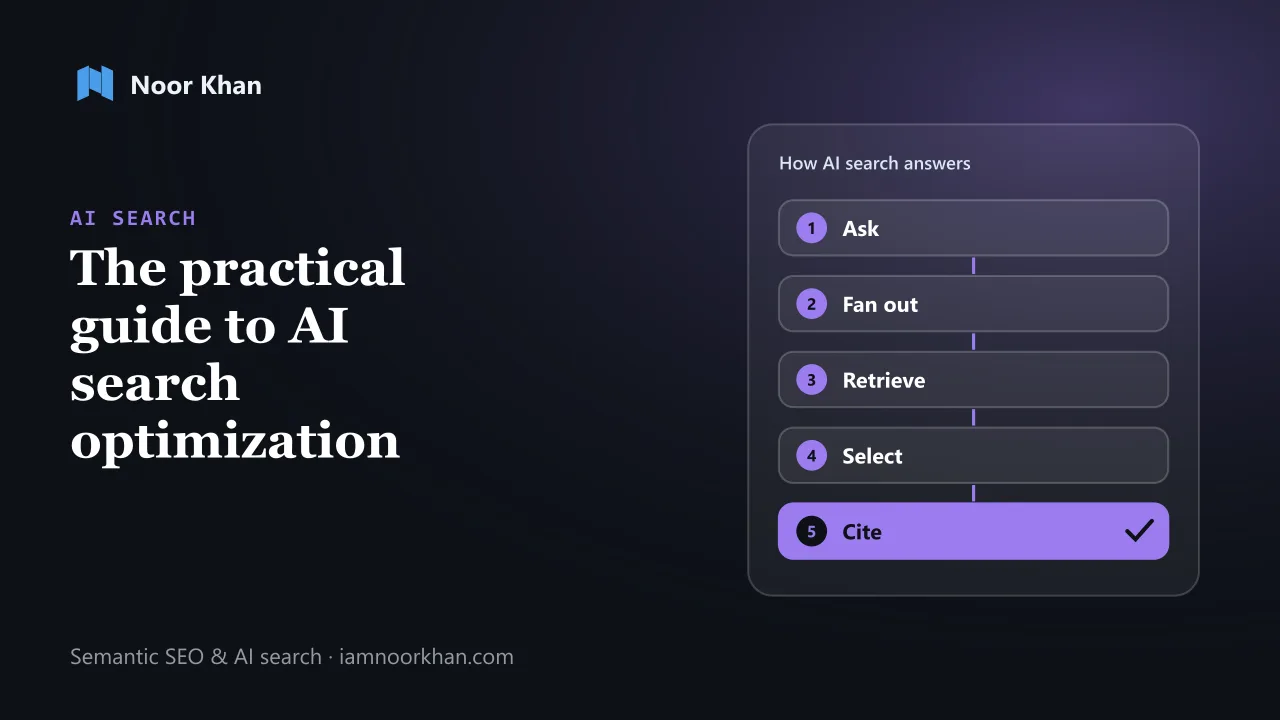 AI Search
 Optimization: The Practical Guide to Getting Found, Cited and Recommended (2026)
How AI search tools choose their sources, what the research and Google's own guidance say actually works, and a 30-day plan, free checklist and audit prompt to get your brand found, cited and recommended.
· 16 min read
AI Search
AI Search Optimization: The Practical Guide to Getting Found, Cited and Recommended (2026)
How AI search tools choose their sources, what the research and Google's own guidance say actually works, and a 30-day plan, free checklist and audit prompt to get your brand found, cited and recommended.
· 16 min read