Technical SEO · Complete guide
What Does an SEO Audit Include? (And What to Ignore)
If you've been handed a 200-line audit and still don't know what to fix first, you're not alone. Here's what a useful audit covers, what it can safely skip, and how to tell a real audit from a crawler export.
 By Noor Khan
Key takeaways
- A useful audit has four layers: technical, topical, competitive and AI readiness. It ends in a prioritized action plan, not a list of every warning.
- Common doesn't mean critical. Ahrefs found 95.2% of 1M+ domains have 3XX redirects and 72.9% have missing or empty meta descriptions. These are usually low impact.
- Google has said text-to-HTML ratio and word count aren't ranking factors, and crawl budget mainly matters for sites with 1M+ pages (or 10k+ changing daily).
- Judge speed on field data: only 48% of mobile sites pass all three Core Web Vitals (Web Almanac 2025), and LCP is the one most sites fail.
- A clean site can still get no traffic. 96.55% of pages get zero Google traffic (Ahrefs, 2023), so content and authority belong in every audit.
If someone has handed you an SEO audit with 300 warnings, a red "site health" score and no clear next step, I want to start by saying: the problem probably isn't you. Most audits are crawler exports with a logo on top. They list everything a tool can detect and leave you to guess what matters.
A good SEO audit does the opposite. It finds the handful of problems actually holding your site back, explains them in plain English, and puts the fixes in order. Everything else is noise, and part of the auditor's job is to tell you, with evidence, which warnings you can safely ignore.
This is the pillar of my technical SEO guides. It covers what a useful audit includes, what to skip, how to triage findings, and how to tell a real audit from a crawler export before you pay for one.
SEO audits by the numbers
These figures explain why so many audits miss the point: the most common issues aren't the important ones, and technical health alone doesn't create traffic.
| Finding | Source |
|---|---|
| 96.55% of pages get no traffic from Google | Ahrefs, 2023 (about 14 billion pages) |
| 95.2% of domains have 3XX redirects; 72.9% have missing or empty meta descriptions | Ahrefs, 2023 (1,002,165 domains) |
| 48% of mobile sites pass all three Core Web Vitals | HTTP Archive Web Almanac, 2025 |
| Crawl budget mainly concerns sites with 1M+ pages, or 10k+ pages that change daily | Google Search Central |
| A 0.1s faster mobile site was associated with 8.4% more retail conversions | Deloitte for Google, 2020 |
What does a good SEO audit include?
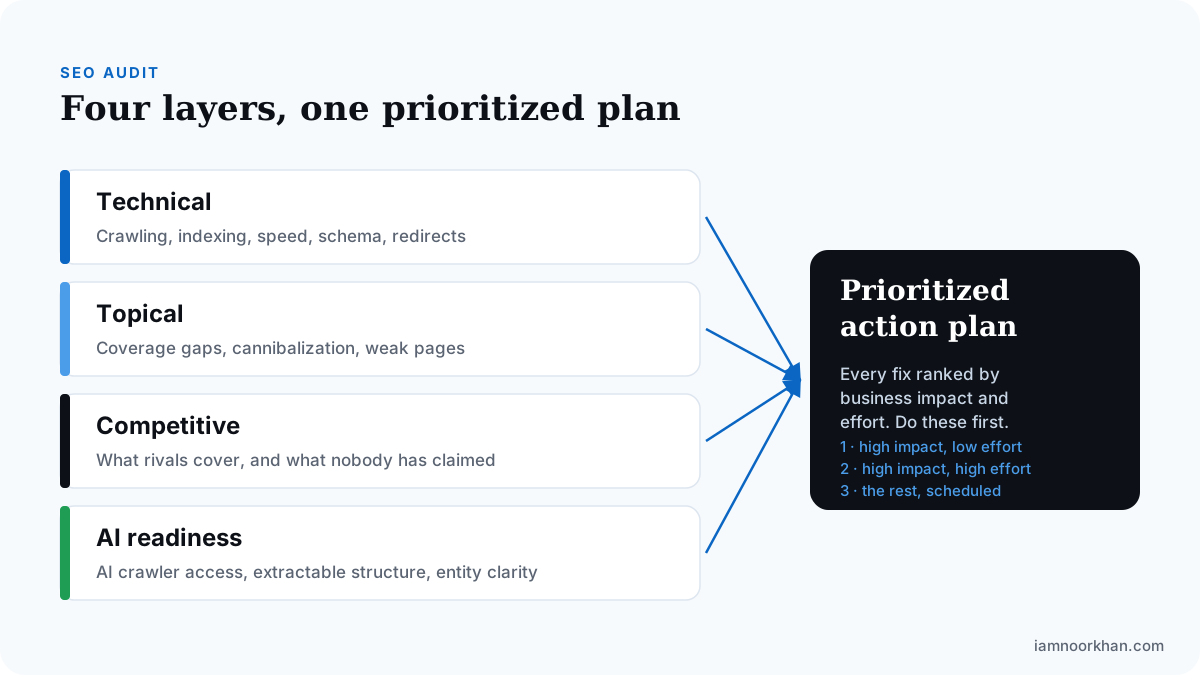
A good SEO audit includes four layers (technical, topical, competitive and AI readiness) and ends in one prioritized action plan. Each layer answers a different question about why the site isn't growing.
| Layer | The question it answers | Typical checks |
|---|---|---|
| Technical | Can search engines crawl, render and index the pages that matter? | Indexing, robots.txt, canonicals, redirects, sitemaps, Core Web Vitals, mobile parity, structured data |
| Topical | Does the content cover the subject completely, one clear intent per page? | Coverage gaps, overlapping pages, thin or outdated pages, internal links |
| Competitive | What do the sites outranking you do that you don't? | Topic and format gaps, link gaps, questions nobody answers well |
| AI readiness | Can AI assistants reach, extract and correctly describe your content? | AI crawler access, answer-first structure, entity clarity, how assistants describe you |
Technical: can Google reach your important pages?
The technical layer checks whether search engines can crawl, render and index the pages that earn you money. This is technical SEO, and the first place I look is always Search Console's Pages report: are the money pages actually indexed?
From there:
- Indexing: important pages excluded, set to noindex, or reported as "Crawled, currently not indexed".
- Canonicals and duplicates: pages pointing their canonical at the wrong URL, or near-identical versions splitting signals.
- Redirects: chains and loops on important URLs, especially after a migration.
- Sitemaps: only canonical, indexable URLs listed.
- Page experience: Core Web Vitals on key templates, judged on field data (more on this below).
- Mobile parity: the mobile version contains the same content, links and structured data as desktop.
- Structured data: valid schema that matches what's visible on the page.
Topical: does your content cover the subject?
The topical layer checks whether your pages cover your subject completely, with one strong page per intent. This is where most growth hides, and it's the layer crawler-only audits skip.
I compare the site against a topical map and look for missing topics, pages competing for the same search intent (keyword cannibalization), pages with impressions but few clicks, and thin pages to improve, merge or remove. Internal linking gets checked here too, because it tells Google which pages you consider most important.
Competitive: what are others doing that you aren't?
The competitive layer shows what the sites outranking you cover, how they structure it and where their authority comes from. The more useful question is what nobody in your market covers well yet, because that's usually where the fastest wins are.
AI readiness: can AI assistants use your content?
The AI readiness layer checks whether assistants like ChatGPT, Perplexity and Google's AI features can reach your pages, extract clear answers and describe your business correctly. I review AI crawler access in robots.txt, whether key pages answer their main question in the first sentence, and how assistants currently describe the brand.
None of this guarantees a citation. It removes the reasons you'd be skipped. For the method, see how to measure AI search visibility and how to structure content for AI answers.
Common doesn't mean critical
The issues audit tools flag most often are usually the least important. A long list of common warnings makes a report look thorough while burying the one problem that matters.
Ahrefs' 2023 study of 1,002,165 domains shows the pattern. Counting a domain if an issue appeared on at least one page:
- 95.2% had 3XX redirects
- 88% had HTTP to HTTPS redirects
- 80.4% had images missing alt text
- 72.9% had a missing or empty meta description
- 63.2% had titles flagged as too long
Almost every site has these, including sites that rank very well. Redirects are often just the result of a site doing the right thing (moving to HTTPS, consolidating old URLs). Alt text matters for accessibility and image search, and meta descriptions can help clicks, but neither is likely to explain why a business isn't growing.
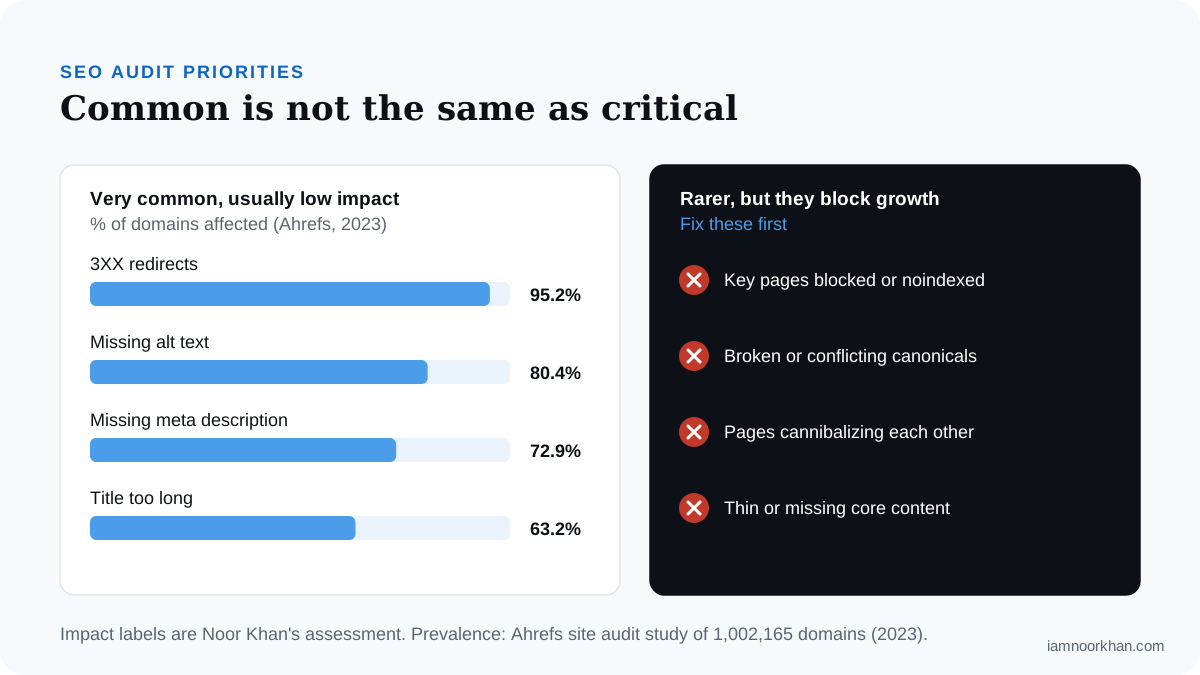
The rarer issues are the ones that cap growth: key pages blocked or set to noindex, canonicals pointing to the wrong URL, several pages competing for one intent, and core service pages missing content people need. These might affect a few URLs, so they barely register in a tool's issue count. They're still the first thing I fix.
Older data shows the same shape. A Semrush study of 100,000 sites (around 2017) reported duplicate content on 50% of sites, broken internal links on 35% and missing meta descriptions on 25%. The tools have changed since then. The lesson hasn't: frequency tells you what's common, not what's costing you money.
What you can safely ignore
You can safely ignore warnings that Google has said it doesn't use, and warnings that only matter at a scale your site isn't at. Here's my ignore list, with the reasoning.
| Warning | Why you can usually ignore it |
|---|---|
| Low text-to-HTML ratio | Google's John Mueller said on Reddit that the ratio "makes absolutely no sense at all for SEO" and advised people to "ignore any report that gives you a text:html ratio." |
| Low word count | Mueller has said "word count is not a ranking factor" (Search Engine Journal), and Google's helpful content guidance lists writing to a word count "because you've heard or read that Google has a preferred word count" as a warning sign. |
| Crawl budget (on most sites) | Google's crawl budget guide is written for sites with 1M+ unique pages changing weekly, or 10k+ pages changing daily. Below that, crawl problems are usually indexing or quality problems in disguise. |
| Missing meta keywords | Google doesn't use the meta keywords tag. |
| Titles a few characters "too long" | If the title reads well and the key words come first, a tool's character limit isn't a ranking rule. |
| Site health score | It's a count of warnings, weighted by the tool. It isn't a Google metric. |
Two warnings go on a "check, don't panic" list. A low text-to-HTML ratio can be a symptom of bloated code that slows mobile pages, so check speed rather than the ratio. And a "thin content" flag is worth a human look: the question is whether the page fully answers its query, not how many words it has.
How to prioritize audit findings
Prioritize by business impact first and effort second, starting with anything that stops your most valuable pages being indexed. This is the triage order I use:
- Indexability blockers on money pages. Noindex tags, robots.txt blocks, wrong canonicals, server errors. If Google can't index the page, nothing else matters.
- Intent and content problems. Pages competing for the same query, missing pages for core services, pages that don't answer what searchers want.
- Internal linking and structure. Important pages buried deep or orphaned, weak links between related pages.
- Page experience on key templates. Core Web Vitals failures in field data, mobile parity gaps.
- Authority. Link gaps against competitors, which usually take the longest to close.
- Cosmetic warnings. Batch them into routine maintenance, or ignore them.
Within each tier, do high-impact, low-effort fixes first. A noindex tag removed from a service page takes five minutes. A template rebuild takes a sprint, so it gets scheduled, not rushed.
As Peter Rota, Senior Technical SEO Manager at HUB International, put it on my podcast: "If you have a basic foundation of SEO, you're going to get 80% of the way there." Triage is how you get that foundation right without drowning in the last 20%.
Example: an audit finding done right
A useful finding names the problem, shows evidence, explains the impact, gives the fix and assigns an owner. Here's an illustrative example of how I write one (not a real client):
| Field | Crawler export | Useful audit finding |
|---|---|---|
| Issue | "Canonical points to different URL (14 pages)" | The 14 location pages all canonicalize to the homepage, so Google treats them as duplicates and only indexes the homepage. |
| Evidence | (none) | Search Console shows all 14 as "Alternate page with proper canonical tag". Zero impressions in 90 days. |
| Impact | "Warning" | High. These pages target "[service] in [city]" searches, the site's highest-intent queries. |
| Fix | (none) | Set each page's canonical to itself. Add a unique local section (team, address, directions) so the pages aren't near-duplicates. |
| Effort / owner | (none) | Canonical fix: 1 hour, developer. Content: 2 days, marketing. |
| How we'll know | (none) | Pages move to "Indexed" in Search Console within a few weeks; local impressions start appearing. |
The left column is what most audits deliver. The right column is something you can act on Monday morning.
Core Web Vitals in context: field data vs lab data
Core Web Vitals should be judged on field data from real users, not just a lab score from one test. Google's thresholds, defined on web.dev, are measured at the 75th percentile of page views:
- Largest Contentful Paint (LCP): good at 2.5 seconds or less, poor above 4 seconds.
- Interaction to Next Paint (INP): good at 200 milliseconds or less, poor above 500 milliseconds. INP replaced First Input Delay on March 12, 2024, so an audit still reporting FID is out of date.
- Cumulative Layout Shift (CLS): good at 0.1 or less, poor above 0.25.
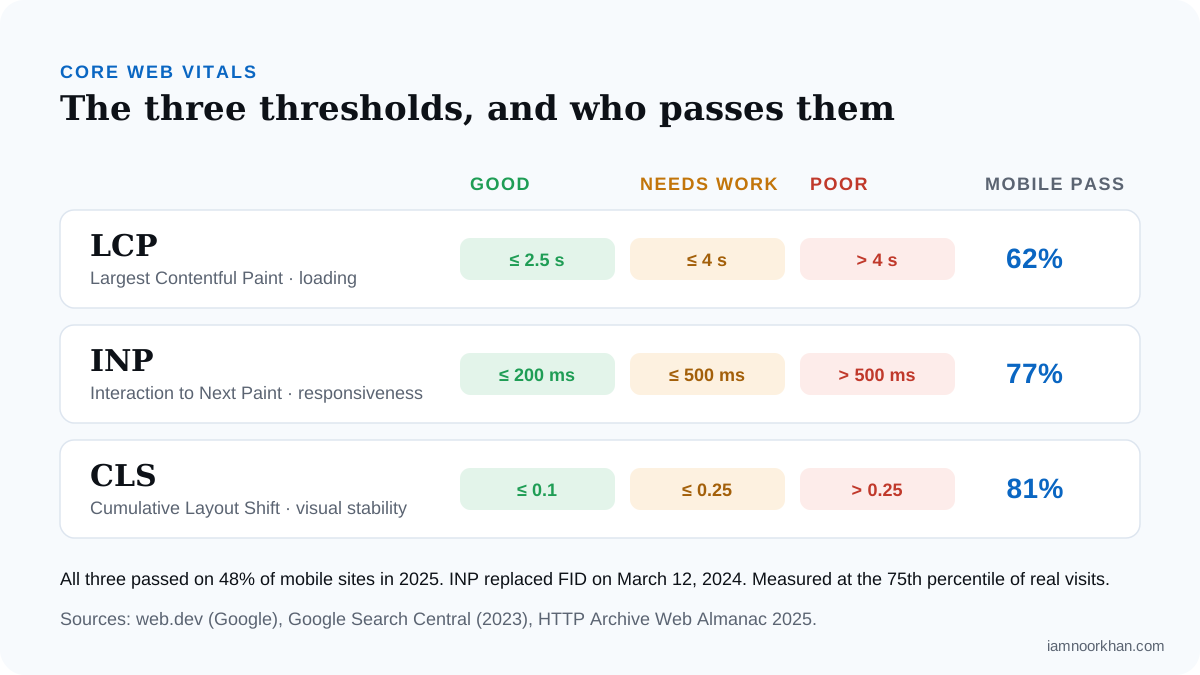
According to the HTTP Archive Web Almanac 2025, 48% of mobile sites pass all three, up from 36% in 2023 and 44% in 2024. On mobile, 81% pass CLS and 77% pass INP, but only 62% pass LCP. So in most audits, LCP is the metric worth the effort: hero images, server response time, render-blocking resources.
Lab tools like Lighthouse are great for debugging, but their scores come from a single simulated load. Search Console's Core Web Vitals report and PageSpeed Insights' field section use real-user data from the Chrome UX Report. If the two disagree, trust the field data and use the lab to find the cause.
Speed matters for revenue, not just rankings. Deloitte's 2020 "Milliseconds Make Millions" study for Google found a 0.1-second mobile speed improvement was associated with 8.4% more retail conversions and 10.1% more in travel. It's correlational, and Google commissioned it, but the direction is consistent with what I see.
Mobile parity: audit the version Google sees
Google completed mobile-first indexing in October 2023, so it crawls and indexes the mobile version of your site. If content, links or structured data exist only on desktop, Google may not see them.
A good audit checks for:
- Content hidden or removed on mobile (tabs are fine, deleted sections aren't).
- Navigation or footer links missing from the mobile menu.
- Structured data, titles and meta robots tags that differ between versions.
- Images or videos that don't load on mobile.
Content and authority: why a clean site can still get no traffic
Technical health removes barriers, but it doesn't create demand. Ahrefs' 2023 study of about 14 billion pages found 96.55% get no traffic from Google at all. The main reasons it gave were no backlinks, no search demand for the topic, and pages that don't match search intent.
None of those show up in a crawler. That's why the topical and competitive layers matter: a technically perfect page about something nobody searches for, or with no links pointing to it, will stay invisible. This is the core of semantic SEO: building topical authority with complete, connected coverage of one subject.
How to tell a good audit from a crawler export
A good audit is shorter than you expect, specific to your business and ordered by impact. Use this scorecard before you pay for one, or to judge one you already have.
| Question | Crawler export | Good audit |
|---|---|---|
| Does it start with your goals and money pages? | No, every URL treated equally | Yes |
| Does it use Search Console and analytics data? | Rarely | Always |
| Is every finding ranked by impact and effort? | Sorted by tool severity | Ranked by business impact |
| Does it explain why each issue matters? | Generic help text | In plain English, for your site |
| Does it cover content, intent and competitors? | Technical only | All four layers |
| Does it say what to ignore? | No | Yes, with reasons |
| Is each fix assigned an owner and a way to measure it? | No | Yes |
| Does it use current metrics (INP, not FID)? | Sometimes not | Yes |
If an audit fails more than two of these, it's probably a tool report. That doesn't make it useless, but expect to do the interpretation yourself.
A practical SEO audit checklist
Use this checklist to run a first pass yourself or to check an auditor's scope.
Technical
- Are all important pages indexed (Search Console → Pages)?
- Any important pages with noindex, robots.txt blocks, wrong canonicals or redirect chains?
- Does the XML sitemap list only canonical, indexable URLs?
- Do key templates pass Core Web Vitals in field data?
- Does the mobile version match desktop for content, links and structured data?
- Is structured data valid and does it match visible content?
Topical
- Does every core service or product have one strong, dedicated page?
- Are any pages competing for the same intent?
- Which pages have impressions but low clicks?
- Which topics in your map have no page yet?
Competitive
- What do the top three competitors cover that you don't?
- Where do their links come from?
AI readiness
- Can AI crawlers reach the site?
- Do key pages answer their main question in the first sentence?
- How do ChatGPT, Perplexity and Gemini describe your business today?
Conclusion
A good SEO audit doesn't try to impress you with volume. It finds the few problems that matter, tells you what to leave alone, and gives you an order to work in. If you finish reading your audit knowing exactly what to do first, it did its job.
If you'd like an audit built this way, with all four layers, a prioritized plan and plain-English reasoning, that's my SEO audit and competitive gap analysis. It's the approach I bring to client work, including healthcare clients like Grove Healthcare (+250% organic traffic). Or start smaller with a free written gap snapshot, and I'll tell you honestly whether a full audit is worth it for your site.
Frequently asked questions
What does an SEO audit include?
A good SEO audit covers technical health (crawling, indexing, canonicals, speed, mobile parity), content and topical coverage, competitive gaps, and readiness for AI search. The most important part is the output: a short, prioritized plan that says what to fix, why it matters and in what order.
How often should you do an SEO audit?
A full audit once a year suits most sites, plus a focused audit after a migration, redesign or large content change. In between, check Search Console's Pages and Core Web Vitals reports every month so problems don't wait a year to surface.
Can I do an SEO audit myself for free?
You can cover the basics with Google Search Console, PageSpeed Insights and a free crawler. The hard part isn't finding issues, it's interpreting them: deciding which few problems actually limit growth and which warnings to ignore.
What is the difference between a technical SEO audit and a content audit?
A technical audit checks whether search engines can crawl, render and index your pages. A content audit checks whether those pages cover your topics completely and satisfy search intent. Either one can cap growth, so a useful audit includes both.
Is a site health score important for SEO?
Not on its own. Site health scores count warnings, and many of the most common warnings have little effect on rankings. A site can score 95 with its most important page set to noindex, so judge an audit by its priorities, not its score.
What should I do after an SEO audit?
Start with the highest-impact, lowest-effort fixes on your most valuable pages, usually indexing and canonical problems. Then schedule bigger work like content restructuring, and re-check Search Console after each batch to confirm the changes landed.
Keep reading
 podcast · 14 min
Peter Rota on What Actually Changes in AI Search
Is GEO just SEO with a new name? Peter Rota (HUB International) on falling clicks, structuring content for AI answers and the first 3 moves on a new site.
· with Peter Rota
podcast · 14 min
Peter Rota on What Actually Changes in AI Search
Is GEO just SEO with a new name? Peter Rota (HUB International) on falling clicks, structuring content for AI answers and the first 3 moves on a new site.
· with Peter Rota
 AI Search
How to Get Your Business Recommended by ChatGPT and AI Assistants
If you've watched competitors get named by ChatGPT while your business doesn't come up, you're not doing anything wrong. You just can't see how these answers get put together yet. This guide shows you how they work and what you can actually control.
· 12 min read
AI Search
How to Get Your Business Recommended by ChatGPT and AI Assistants
If you've watched competitors get named by ChatGPT while your business doesn't come up, you're not doing anything wrong. You just can't see how these answers get put together yet. This guide shows you how they work and what you can actually control.
· 12 min read
 Healthcare SEO
Addiction Treatment SEO: How Rehab Centers Win Admissions from Search
The people searching for treatment are often frightened, exhausted and searching on behalf of someone they love. This guide shows how a rehab center earns their trust in search, honestly and within the rules.
· 12 min read
Healthcare SEO
Addiction Treatment SEO: How Rehab Centers Win Admissions from Search
The people searching for treatment are often frightened, exhausted and searching on behalf of someone they love. This guide shows how a rehab center earns their trust in search, honestly and within the rules.
· 12 min read